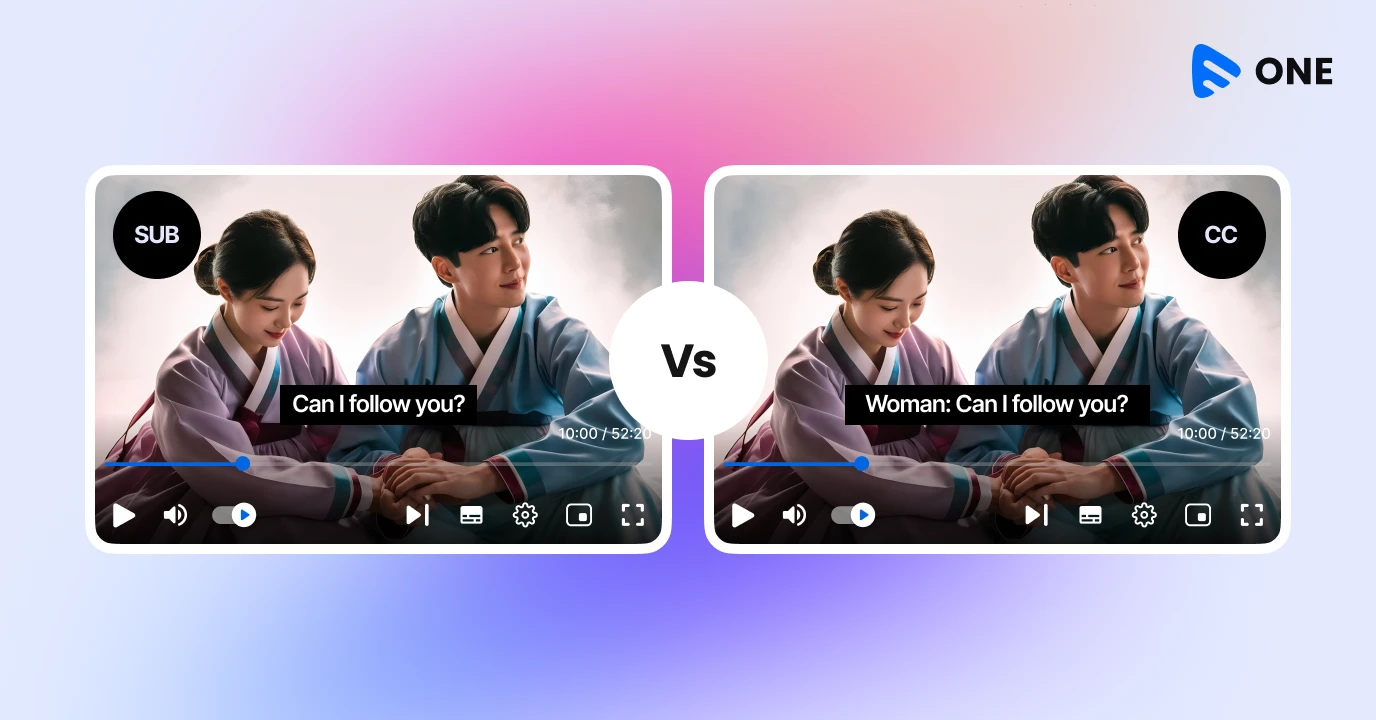
‘Closed captions vs subtitles’ – ever wondered what’s the difference? While most people use these terms like they’re the same thing, they are not. And if you’re building a streaming brand or trying to reach a global audience, getting the distinction wrong can mean the difference between an engaged fan and a frustrated viewer who clicks away.
Understanding these nuances can help you deliver better experiences to your audience, improve accessibility, and even expand your reach globally. This blog will help you break down what exactly closed captions vs subtitles are, when to use them, why both matter for streaming platforms and how Muvi One powered by Alie AI can enable smart captions for your content to reach a global audience.
What are Closed Captions?
Closed captions are textual representations of everything that’s happening in your audio track. That means they transcribe dialogue and all the sounds that shape the experience — things like:
- Background noises
- Music cues
- Sound effects
- Speaker identification
The keyword here is inclusive — closed captions ensure someone who cannot hear the video’s audio gets a full understanding of what’s happening on screen.
You’ll often see closed captions used in:
- Content for Deaf or hard-of-hearing audiences
- Videos people watch on mute (social media reels, livestreams, mobile browsing)
- Educational or training videos with complex audio cue
Open vs Closed Captions
There are two types of captions: open and closed.
Open captions cannot be turned off and are “burned” into the video file itself.
Closed captions can be turned on and off by the viewer and are typically found in a settings menu. There are two different types of closed captions:
Two Types of Closed Captions
They’re not different types of captions in terms of purpose — both are closed captions — but they differ a lot in capability, flexibility, and where they’re used.
1. CEA-608 Captions (Line 21 Captions)
CEA-608 is the older captioning standard. You’ll often hear it called “Line 21 captions.”
Why “Line 21”?
Back in analog TV days, captions were embedded into line 21 of the video signal. That’s where the name comes from.
Key characteristics of 608 captions:
- Limited styling options
- Fixed fonts and sizes
- Basic colors only (usually white text)
- Limited characters per line
- Supports only one caption language
- Designed originally for analog NTSC broadcasts
Where 608 captions are still used:
- Legacy broadcast workflows
- Some cable TV systems
- Backward compatibility in modern streams
- Certain OTT platforms that still accept embedded captions
Even today, many broadcasters still require 608 captions because older devices and set-top boxes rely on them.
Read More:
How to Launch Your OTT Platform Instantly
Buy vs Build Your OTT Platform
2. CEA-708 Captions (Digital TV Captions)
CEA-708 is the newer and far more advanced standard, designed for digital television (ATSC).
If 608 captions are “basic text,” 708 captions are fully featured and customizable.
Key characteristics of 708 captions:
- Multiple fonts, sizes, and colors
- Advanced positioning on screen
- Support for multiple languages
- Better handling of sound effects and speaker IDs
- Designed for HD and digital broadcasts
- Works better across modern devices
708 captions give content creators far more control over how captions look and behave — which is why they’re preferred in modern streaming workflows.
Caption Display Styles
Beyond caption standards like 608 and 708, closed captions also differ in how they appear on screen — known as caption display styles. The three most common styles are roll-up, pop-on, and paint-on, and each serves a distinct use case.
Roll-Up- Roll-up captions are typically used in live programming such as news or sports. As new lines are spoken, the text scrolls upward line by line, closely mirroring real-time speech
Pop-On – Pop-On captions appear all at once as a complete block of text and then disappear before the next caption appears. This style is widely used for pre-recorded content like movies, TV shows, and on-demand videos because it’s easier to read and stays perfectly in sync with dialogue.
Paint-On – This works differently — characters appear on screen one after another, almost as if someone is typing them live. This style is less common today due to readability issues but was historically used in older live broadcasts.
Modern OTT and streaming platforms generally favor pop-on captions for VOD and roll-up captions for live streams, as they provide the best balance of clarity, timing, and viewer comfort.
Learn How to Set up Multiple Languages for Websites and Apps by Clicking Here!
When Should You Use Captions?
Closed captions should be used anytime your video content needs to be accessible, understandable without sound, or compliant with accessibility standards. If your audience includes Deaf or hard-of-hearing viewers, captions aren’t optional — they’re essential.
Captions are also critical for live streams, webinars, news, sports, and events where viewers may be watching in noisy environments or on mute. On mobile and social platforms, where videos often autoplay without sound, captions help retain attention and improve completion rates.
They’re equally important for training, educational, and corporate videos, where clarity and comprehension matter.
With Alie automating caption generation and Muvi One supporting captions natively across live and VOD streams, accessibility becomes a key extension of your video platform.
What are Subtitles
Subtitles serve a different purpose.
While captions aim for accessibility, subtitles are mainly about language comprehension.
Think of subtitles as a translation of spoken dialogue — typically from one language into another. For example:
- A French movie streamed in the U.S. might display English subtitles
- A Spanish vlog might use Portuguese subtitles for Brazilian audiences
Unlike closed captions, subtitles don’t usually include sound effects or ambient noises — they focus on what’s said and not the extra audio context.
That said, there are cases where subtitles are also used in the same language — commonly when someone has trouble understanding accents or speech clarity. But even in those cases, they still differ from closed captions because they typically omit non-speech cues.
Read more on Alie AI subtitles from our blog Automated Subtitling Made Easy with AI Subtitle Generator
Types of Subtitles You Should Know About
There are three main types of subtitles, each designed for a slightly different viewing need. Subtitles for the Deaf and hard of hearing (SDH) go beyond translating dialogue — they also include speaker identification, sound effects, and music cues, making them similar to closed captions but often delivered as subtitles in multilingual content.
Non-SDH subtitles are the most common and focus purely on translating spoken dialogue for viewers who can hear the audio but don’t understand the language being spoken.
Forced narrative subtitles appear automatically on screen to translate essential information that isn’t in the primary language — such as a foreign conversation, a street sign, or a whispered line — even when subtitles are otherwise turned off.
When Should You Use Subtitles?
Subtitles should be used when your goal is to bridge language gaps rather than describe audio details. They’re ideal for content meant for international or multilingual audiences, such as films, series, documentaries, product demos, and educational videos distributed across regions. Subtitles are also useful when viewers can hear the audio clearly but may struggle with accents, fast speech, or unfamiliar terminology. In short, if your content relies on spoken dialogue and you want it to be understood by people who speak different languages — without adding sound cues or descriptions — subtitles are the right choice.
Closed Captions vs Subtitles: A Neat Comparison
Feature | Closed Captions | Subtitles |
Includes dialogue | Yes | Yes |
Includes sound effects & cues | Yes | No |
Best for accessibility (Deaf/hard of hearing) | Yes | only with SDH |
Best for language translation | No | Yes |
Often used on streaming | Yes | Yes |
Viewer can toggle on/off | Usually | Usually |
Closed Captions vs Subtitles: Why Do They Matter?
1. Accessibility — It’s Not Optional
Closed captions aren’t just “nice to have.” They are a cornerstone of accessibility.
In many regions (including the U.S.), platforms are expected to provide captions to meet legal accessibility standards, for example under ADA or similar guidelines.
But beyond compliance, captions are good business:
- They make your content usable by people who are deaf or hard of hearing
- They keep viewers watching with the sound off
- They improve retention — people stay longer when they can clearly follow what’s happening
2. Global Reach Through Subtitles
If you’re planning to serve audiences across languages and regions, subtitles are your bridge to more viewers.
Imagine:
- A Malayalam film with English subtitles
- A Japanese cooking show subtitled in Hindi
Your content suddenly becomes global, transcending language barriers.
3. Better Engagement and SEO
Believe it or not, text in videos — captions or subtitles — can help search engines understand your content better.
Search engines crawl text. When your video comes with a transcript, it’s more discoverable. That’s why platforms that index subtitles or captions can outperform those that don’t.
On social media, captions make videos easier to watch on mute — and almost all modern mobile viewership starts muted. That means if your video doesn’t have them, you’re missing engagement.
Closed Captions vs Subtitles? When to Use What?
Use captions when:
- Accessibility is a priority for Deaf or hard-of-hearing viewers
- Your content includes important non-speech audio like music, sound effects, or background noise
- Videos are likely to be watched on mute (social media, mobile viewing)
- You’re streaming live events, webinars, training sessions, news, or sports
- You need to meet accessibility or compliance requirements
Use subtitles when:
- Language is the main barrier to understanding
- Your audience is international or multilingual
- Viewers can hear the audio but may not understand the spoken language
- You’re distributing films, series, documentaries, or global OTT content
- You want to expand reach without adding audio descriptions
How Muvi One Enables Smart Subtitles and Closed Captions
Manually typing out captions for a 2-hour movie or a 50-episode series is a nightmare. It’s slow, expensive, and prone to typos. This is where Muvi’s ecosystem changes the game.
Alie — Your Automated Captioning & Subtitle Assistant
Every video creator knows the pain of manually transcribing dialogue or exporting SRT files.
With Alie, you can:
- Auto-generate accurate closed captions with sound cues
- Create subtitles in multiple languages
- Edit and customize them directly in the dashboard
- Export or embed them seamlessly into your streams
No third-party tool required, no manual uploads, no export/import headaches.
Whether it’s a webinar, marketing video, live event, or premium series — Alie handles it for you.
Muvi One — Captioning & Subtitles Built into Streaming Infrastructure
If you’re launching your own streaming platform with Muvi One, captioning isn’t an afterthought — it’s a core feature.
With Muvi One, you can:
- Easily enable closed captions for VOD and live streams
- Upload or auto-generate subtitles in the languages your audience speaks
- Let viewers toggle captions on/off during playback
- Deliver accessibility and localization without extra plugins
Final Thought
Captions and subtitles aren’t just technical terms — they’re strategic tools that can help your platform reach a wider audience, improve engagement, and make your content meaningful for everyone.
Take a 14 day Free Trial to get more clarity!
Or Talk to our Sales Team!







Add your comment