It often happens that users settle in to watch something, and thirty seconds in, the video freezes to load more data. Or it plays, but looks noticeably blurrier. When this happens, users do not stick around to figure out why — they just close the tab and go somewhere else.
This is due to ABR. Adaptive bitrate streaming (ABR) works quietly in the background of nearly every OTT platform you use, constantly adjusting video quality so playback stays smooth no matter what your connection is doing.
In this guide, we’ll break down what adaptive bitrate streaming actually is, why it replaced older streaming methods, how it works under the hood, and which protocols power it — so you know exactly what to look for if you’re building or evaluating a streaming platform.
What Is Adaptive Bitrate Streaming (ABR)?
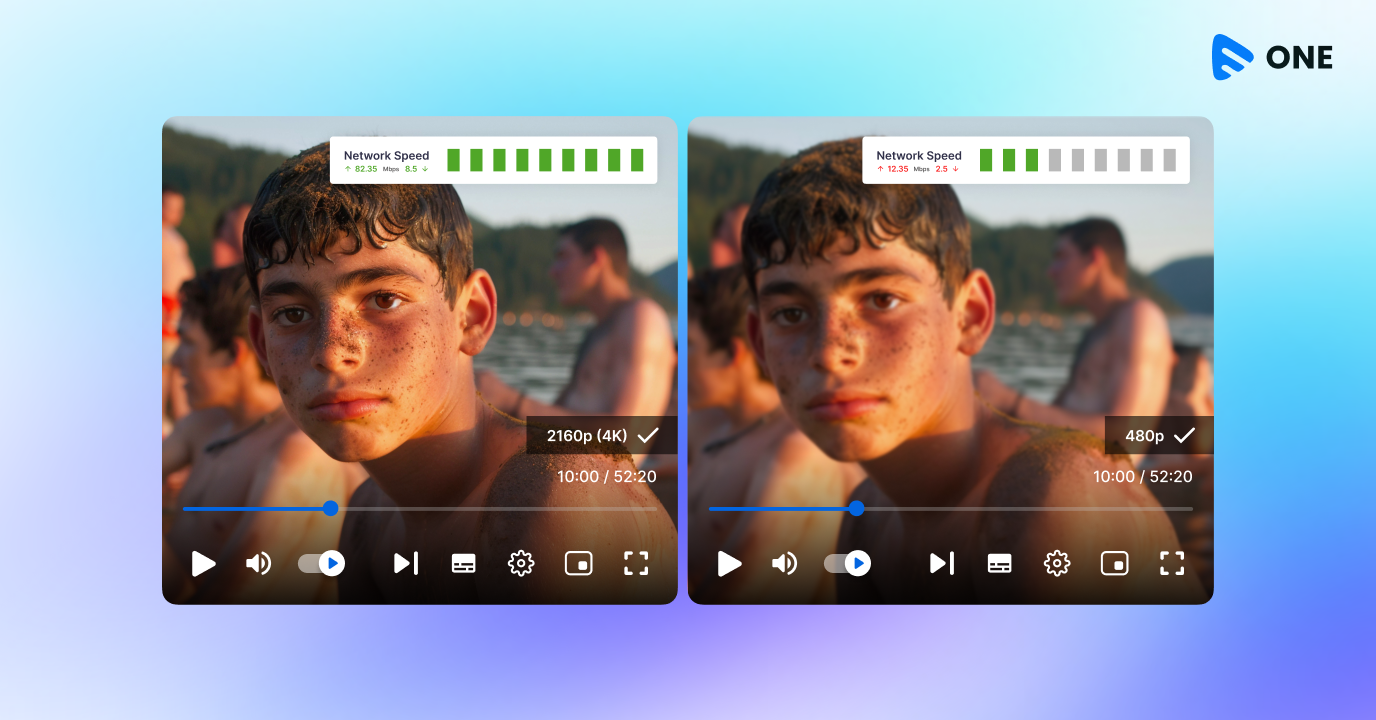
Adaptive bitrate streaming, abbreviated as ABR, refers to the ability of a video player to adjust the quality of a video dynamically according to the available bandwidth, network conditions, and the user’s device performance. In simple terms, think of it like a highway with several lanes of different widths — instead of forcing every car onto the same lane regardless of traffic, ABR lets each viewer’s “car” move to whichever lane (quality level) keeps it flowing smoothly.
To sum it up, adaptive bitrate streaming allows seamless content-quality switching, which progressive video playback simply doesn’t support. To understand why that matters, it helps to look at what progressive streaming gets wrong.
Progressive Streaming
In progressive video streaming, a single video content file, mostly in an .mp4 format, is streaming all over the Internet. However, other video formats can be used too. This video file can be compressed as well as stretched according to the screen size of different devices.
That is supposed to be a good feature, isn’t it?
Remember we had mentioned that progressive streaming comes with an issue? Well, as the size of the video file remains the same, the quality of video gets affected when played on a screen that has higher or lower resolution.
So, basically a video of 720 x 480px will pixelate when played on a screen of resolution 1280 x 720px.
To know more about video resolutions, check out our blog on “SD, HD, AND 4K- Streaming Resolutions Explained”.
The next issue associated with progressive streaming is buffering, i.e. video pausing in between streaming. This is one situation that most of us have encountered at least once in our lifetime.
It mostly happens when the user has unstable internet connection. The video stream is not downloaded at a faster rate resulting in a halt in the video till more data is fetched for further streaming.
This is the ultimate patience tester for a viewer and eventually leads to bad streaming experience and subsequent churn. Want to know more about how to have low churn on your streaming platform??
Check out our blog on OTT Churn Management Strategy: How to maintain a low OTT churn rate like Netflix.
Why Progressive Streaming Falls Short
In progressive video streaming, a single video file — usually in .mp4 format — is delivered over the internet as-is. That file can be resized to fit different screens, but it can’t be re-encoded on the fly, and that’s where the trouble starts.
The quality problem: Because the file size and encoding stay fixed, quality suffers whenever the file doesn’t match the viewer’s screen. A video encoded at 720×480px will pixelate when stretched to play on a 1280×720px screen, and the same file will look unnecessarily heavy — wasting bandwidth — on a smaller display.
The buffering problem: The second issue is buffering — video pausing mid-playback while more data loads. This happens most often when a viewer’s internet connection is unstable: the device can’t download the video fast enough to keep up with playback, so it stalls and waits. Research from Columbia University has found that viewers commonly abandon a stream after just a couple of seconds of buffering, which makes this far more than a minor annoyance — it’s a direct driver of viewer churn.
Adaptive bitrate streaming was built specifically to solve both of these problems at once.
How Does Adaptive Bitrate Streaming Work?
ABR isn’t a single feature — it’s a pipeline made up of a few distinct steps that happen before and during playback. Here’s what’s actually happening behind the scenes.
Encoding & Transcoding
Before a video ever reaches a viewer, it’s encoded (or transcoded, if starting from an already-compressed file) into multiple versions — each at a different bitrate and resolution. This is what creates the range of quality levels a player can later choose from, from a lightweight 240p stream for weak connections up to 4K for high-bandwidth, high-end devices.
Segmenting Video into Chunks
Each of those encoded versions is then split into small segments, typically between 2 and 10 seconds long. Breaking the video into chunks — rather than treating it as one continuous file — is what makes mid-stream quality switching possible. A player doesn’t have to commit to one quality for the whole video; it can request a different bitrate for the very next chunk.
The Manifest File (.m3u8 / .mpd)
Before playback starts, the video player downloads a manifest file, which acts like a menu of everything available: every bitrate, resolution, and where to find each segment. Depending on the protocol in use, this file is either an .m3u8 playlist (HLS) or an .mpd file (MPEG-DASH). Without the manifest, the player would have no way of knowing what quality options exist or how to request them.
How the Player Chooses a Bitrate (the ABR Algorithm)
This is the “adaptive” part. As the video plays, the player continuously monitors signals like download speed and buffer health, then decides which bitrate to request next. Broadly, ABR algorithms fall into two camps:
- Throughput-based algorithms estimate available bandwidth from recent download speeds and pick the highest bitrate that connection can sustain.
- Buffer-based algorithms look at how much video is already buffered and adjust quality to keep that buffer healthy, even if bandwidth estimates fluctuate.
Most modern players blend both approaches. The result: playback typically starts at a conservative, lower bitrate to get video on screen quickly, then steps up in quality once the player confirms the connection can support it — and steps back down smoothly if conditions worsen, instead of stalling.
The Encoding Ladder Explained
The full set of bitrate/resolution versions prepared for a video is known as an encoding ladder. Picture it literally as a ladder: the top rung is a high-bitrate, high-resolution stream for viewers with fast connections and large screens, and the bottom rung is a small, low-bitrate version for constrained connections or smaller devices. The player moves up and down this ladder as network conditions change.
A typical encoding ladder might look like this:
Bitrate (kbps) | Resolution |
235 | 320×240 |
375 | 384×288 |
560 | 512×384 |
750 | 512×382 |
1050 | 640×480 |
1750 | 720×480 |
2350 | 1280×720 |
3000 | 1920×720 |
4300 | 1920×1080 |
5800 | 1920×1080 |
The more “rungs” in the ladder, the smoother the quality transitions feel to viewers — though that comes at the cost of extra storage and processing. Many modern platforms now use content-aware or per-title encoding, which analyzes each video’s complexity (a static talking-head video vs. a fast-motion action scene) and builds a custom ladder for it, rather than applying the same fixed ladder to every asset.
Read More: Encoding Ladders: All you Need to Know for Optimal Video Streaming
SD, HD, AND 4K- Streaming Resolutions Explained.
ABR Streaming Protocols: HLS vs. MPEG-DASH vs. Others
ABR is the concept; HLS and MPEG-DASH are the protocols that actually implement it in production.
HLS (HTTP Live Streaming): Developed by Apple, HLS uses .m3u8 manifest files and has become close to a universal standard — it’s natively supported in Safari and works across most modern browsers and devices without extra libraries.
MPEG-DASH (Dynamic Adaptive Streaming over HTTP): An open, codec-agnostic international standard using .mpd manifest files. DASH offers more flexibility than HLS but isn’t natively supported in browsers, so it typically requires a JavaScript-based player (like dash.js) to run.
Other protocols worth knowing:
- CMAF (Common Media Application Format) is a newer container format compatible with both HLS and DASH, letting platforms deliver both without duplicating encodes.
- WebRTC supports ABR-style adaptation for ultra-low-latency use cases, adjusting quality in milliseconds rather than seconds — useful for interactive or real-time streaming, though it doesn’t scale to large audiences as easily without additional infrastructure.
- RTMP, the older streaming protocol, predates HTTP-based ABR and generally isn’t recommended for adaptive delivery today.
For most on-demand and live OTT use cases, many platforms deliver both HLS and DASH side by side to maximize device compatibility.
Key Benefits of Adaptive Bitrate Streaming
Key benefits of adaptive bitrate streaming include:
- Uninterrupted playback: Viewers get continuous streaming with minimal buffering, even on fluctuating connections.
- Optimal quality per device: Every viewer gets the best resolution their bandwidth and screen can actually support — no pixelation, no wasted bandwidth.
- Faster start-up times: Playback typically begins at a lower bitrate, so video starts almost instantly rather than waiting to buffer a high-quality stream upfront.
- Wider audience reach: ABR works across mobile, smart TVs, desktops, and everything in between, regardless of connection type.
- Lower churn, higher engagement: Fewer playback interruptions translate directly into longer watch time and reduced viewer drop-off.
- Scalability: Because ABR is HTTP-based, it works seamlessly with standard CDNs, making it easy to scale to large, concurrent audiences.
How Muvi One Powers Adaptive Bitrate Streaming
(Keep this section largely as-is — move it here, after the educational content, so it reads as the natural next step rather than replacing the explanation.)
Adaptive bitrate streaming has turned out to be the most essential capability of a player for delivering an optimum streaming experience. If you own a streaming channel or plan to launch one, the first thing you need to look for is whether your player supports adaptive bitrate streaming.
Muvi One provides an instantly deployable, completely customizable audio/video streaming platform that delivers unparalleled streaming experience to users all across the world. Our powerful Online Video Player is packed with robust features to provide uninterrupted streaming on your white-labeled OTT platform.
Sign up now and take a 14-day free trial to explore more!







Add your comment