If you’ve ever opened a TV guide on your set-top box, scrolled through channel listings on an app, or checked what’s playing on a FAST channel, you’ve used an EPG. It’s the schedule layer that sits between broadcasters and viewers — telling people what’s on, what’s coming next, and what they might have missed.
As a viewer, we all want to browse through the content list of a channel (be it FAST Channel or linear TV channel), so that we can know when they will be broadcasting our favorite shows.
This guide covers what an EPG is, how it works technically, where it’s used today, what formats it relies on, and why it’s become a much bigger deal with the rise of FAST channels and OTT streaming in 2025–26.
What is EPG? What Does EPG Stand For?
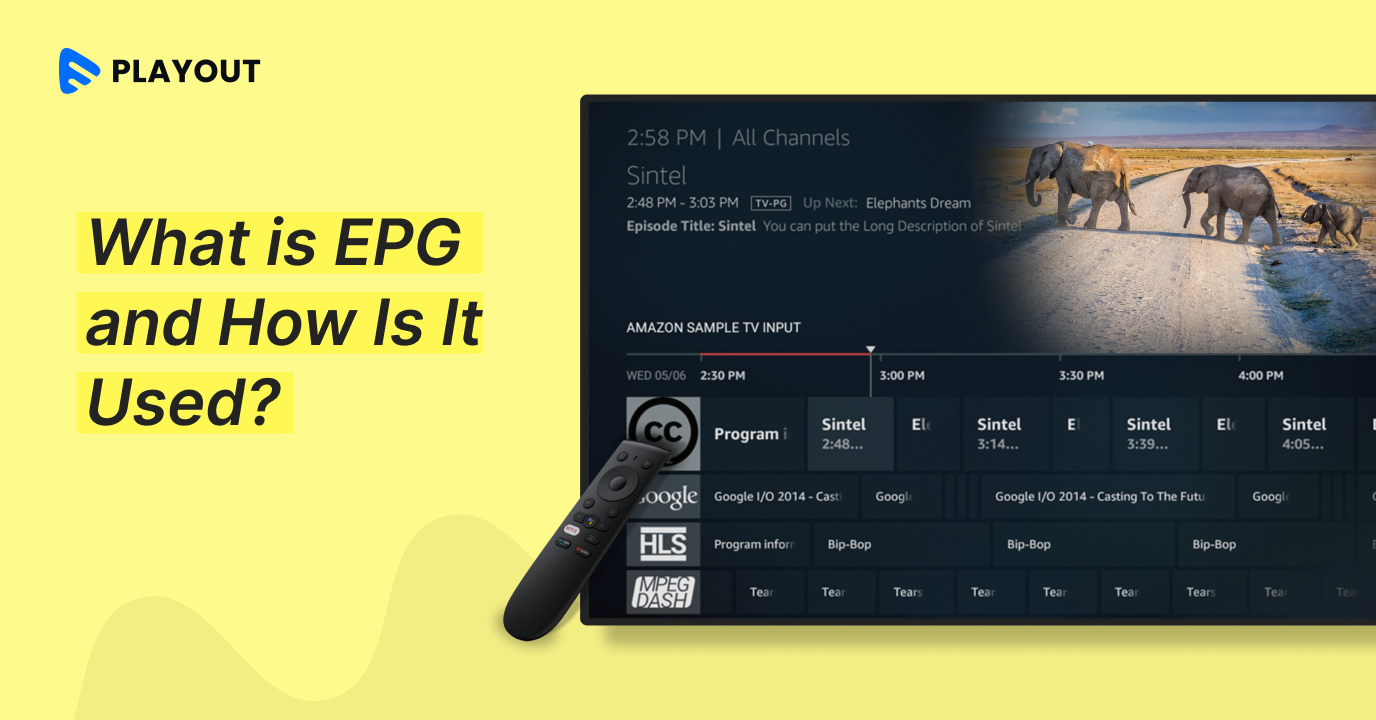
Simply put, EPG stands for Electronic Program Guide. It is a digital schedule that shows viewers which content is airing on a channel, when it aired, and what’s coming up. Think of it as a TV listings magazine, but generated automatically, updated in real time, and displayed directly on your screen.
From the viewer’s side, an EPG shows a grid of channels and time slots. You can scroll across channels and forward or backward in time to find something to watch. EPGs can cover a few hours, a full day, a week, or even longer. Most broadcast platforms show a 7-day window, though the viewer typically only looks at what’s playing now and in the next few hours.
EPG vs IPG — What’s the Difference?
These two terms are often used interchangeably, but there’s a small difference worth knowing.
EPG is the basic schedule display. It shows what’s on, with program names, times, and descriptions. Traditional cable and satellite systems use this format.
IPG (Interactive Program Guide) is a step up from EPG. It lets viewers do things directly from the guide, like recording shows, setting reminders, or filtering by genre. Most modern streaming platforms have moved to IPG-style interfaces.
In practice, the industry still uses ‘EPG’ as a catch-all term for both, so you’ll see them used interchangeably. The distinction matters more for engineers building the system than for end viewers.
How Does EPG Work?
An EPG is a software system that fetches schedule data from a source — either a broadcaster’s own system or a third-party data provider — and displays it in a structured, navigable format.
Here’s the basic flow for how it works:
- The broadcaster or channel operator creates a schedule. This lists each piece of content, its title, description, start time, duration, and any metadata like genre or rating.
- The schedule is formatted into a standard data format (more on this in the next section) and published via a URL or data feed.
- The EPG system — whether that’s a set-top box, an IPTV app, or a streaming platform — fetches this data at regular intervals to stay current.
- The data is parsed and rendered as the grid or list interface the viewer sees.
- When the viewer interacts — scrolling, clicking a program, setting a reminder — the EPG handles that action using the data it already has.
Modern EPG systems also apply algorithms to the data. They look at what a viewer has watched before, what time they usually watch, and what’s popular in their region, then surface relevant content higher up or suggest it in a separate recommendations row.
See how Muvi Playout automates your EPG schedule — Start your 14-day free trial!
EPG Data Formats: XMLTV, M3U, and JSON
If you’re setting up or integrating an EPG — as a broadcaster, developer, or IPTV operator — you’ll run into a few specific data formats. Here’s what each one is and when it’s used.
XMLTV
XMLTV is the most widely used EPG format in the broadcast and IPTV world. It’s an XML-based format where each program entry includes a start time, stop time, channel ID, title, description, and optional fields like category, episode number, rating, and icon (poster image).
A typical XMLTV file has two sections: a list of channels (with IDs and display names) and a list of programmes (scheduled content). EPG aggregators, IPTV boxes, and playout systems all read and write XMLTV.
EPG URL / M3U
M3U is a playlist format used in IPTV setups. It lists channels with their stream URLs. An EPG URL is usually included in an M3U playlist as a reference — it tells the IPTV player where to fetch the schedule data (typically an XMLTV file) for the channels in that playlist.
JSON EPG
JSON is increasingly used for EPG data in OTT and streaming platforms. It’s easier to work with in modern web and app environments compared to XML. OTT platforms often expose their schedule data through a REST API that returns JSON, which the frontend app then renders as an EPG grid or list.
What is EPG Time Shift?
EPG time shift lets viewers pause, rewind, or fast-forward live content. It’s the feature that lets you step away from a broadcast and come back to it without missing anything.
When time shift is enabled, the system records a rolling buffer of the live stream in the background. The EPG interface shows this as part of the schedule, and the viewer can scrub back through the buffer as if they were watching on-demand content.
EPG for FAST Channels (2025–26 Growth)
FAST refers to Free Ad-Supported Streaming TV. These are linear channels you can watch for free, with the revenue model based on ads rather than subscriptions. Pluto TV, Tubi, Samsung TV Plus, and Plex TV are well-known examples, but the category has expanded massively — most smart TV platforms now run hundreds or thousands of FAST channels.
EPG is critical for FAST channels for a few reasons:
- FAST channels run like traditional linear TV — you can’t just pick what to watch. The EPG tells viewers what’s on so they can decide whether to tune in.
- Ad insertion in FAST channels happens at specific break points in the schedule. The EG data needs to reflect these breaks accurately so ad servers can fill them correctly.
-
- FAST channel schedules often change more frequently than traditional broadcast schedules — content libraries shift, seasonal programming is swapped in, and ad-driven models mean the schedule is constantly being optimized.
Launch your FAST channel with built-in EPG — Muvi Playout handles scheduling, metadata, and multi-platform distribution.
What is EPG on a Smart TV?
On a smart TV, the EPG is the on-screen guide you access when you press the ‘Guide’ button on your remote. It shows a channel-by-channel, time-by-time grid of what’s playing.
Smart TV manufacturers — Samsung, LG, Sony, and others — build EPG interfaces directly into their operating systems.
Typical things you can do from a smart TV EPG:
- Browse channels and times in a grid layout
- View program descriptions, episode info, and duration
- Set reminders for upcoming shows
- Schedule recordings on supported systems
- Jump directly into a live stream from the guide
- Access catch-up content for shows that already aired
Where Can You Access an EPG?
EPGs appear across nearly every platform that delivers live or linear TV. Common places you’ll find them:
- Cable and satellite boxes — built-in channel browsing and scheduling, typically a 7-day grid
- Smart TVs — integrated guides for live channels, FAST services, and connected apps
- FAST channel apps like Pluto TV and Tubi — grid-style guides for their linear channel lineup
- OTT streaming services with live channels — platforms like Hulu Live or Sling use EPG-style interfaces for their live TV sections
- Mobile and web TV guide apps — standalone EPG apps that aggregate schedules across multiple services
EPG on Different Platforms: A Comparison
EPG works differently depending on the platform it’s deployed on. Here’s a side-by-side look:
Feature | FAST Channel | Smart TV | OTT (Live) |
Schedule grid | Yes | Yes | Yes |
Real-time updates | Yes (dynamic) | Varies | Yes |
Ad-break slots | Yes | No | Sometimes |
Personalized reco. | Growing | Yes | Yes |
Catch-up / time-shift | Limited | Yes | Yes |
Multi-device sync | Growing | Yes | Yes |
Modern EPG Capabilities: Beyond the Basic Grid
The EPG has evolved well past a simple schedule grid. Modern EPG systems are closer to content discovery engines than traditional TV guides. Here’s what’s expected in a competitive EPG today:
Smart Search and Filtering
Viewers can search for shows by title, filter by genre, language, or content rating, and find content across all available channels in one step.
Rich Metadata
Modern EPG entries include poster images, episode descriptions, cast and crew details, content ratings, and genre tags. This metadata makes the guide easier to browse and helps viewers make quick decisions about what to watch. It also feeds recommendation algorithms.
Real-Time Schedule Updates
For live events and FAST channels, schedules can shift at any time — a game goes into overtime, a breaking news segment replaces regular programming, or a channel’s ad-driven schedule gets re-optimized.
Visual Layouts Across Devices
The EPG grid that works well on a 55-inch TV is very different from what works on a phone. Modern EPG systems adapt their layout for the screen — a horizontal grid on TV, a vertical list or card-based layout on mobile.
Cross-Device Continuity
You set a reminder on your phone, then the show starts on your TV. Or you start watching on mobile and resume on your smart TV. This kind of cross-device continuity is something OTT platforms already do well.
AI and Personalization in Modern EPGs (2025–26)
AI is changing how EPGs work at a few different levels. It’s not just about recommending content — it’s changing how schedules are built and how viewers navigate them.
Machine Learning Recommendations
AI systems analyze viewing history, time of day, device type, and content preferences to surface relevant shows in the EPG. Instead of a flat alphabetical or chronological list, the guide reorders itself based on what a viewer is likely to watch. This is now standard on major streaming platforms and increasingly common in FAST channel apps.
Voice Search Navigation
‘Show me crime dramas tonight’ or ‘What’s on ESPN right now?’ — voice-driven EPG navigation is becoming a mainstream feature on smart TVs, streaming devices, and even some IPTV platforms. Voice search queries need to map to EPG data accurately, which requires well-structured metadata and a robust search layer behind the guide.
Multi-Device EPG Sync
AI-driven personalization needs to follow the viewer across devices. A recommendation made on mobile should carry over to the TV. Viewing history captured on the smart TV should inform suggestions on the phone app. This requires a consistent user profile layer that sits behind all the EPG interfaces on different devices.
AI-Optimized Scheduling (for Broadcasters)
On the broadcaster side, AI tools are starting to help with schedule optimization — analyzing audience data to determine the best time slots for content, predicting which shows will drive the highest engagement at which times, and automatically adjusting FAST channel schedules to maximize ad revenue.
Muvi Playout’s EPG feature supports real-time updates, multi-format export, and metadata management for IPTV and FAST channels.
Benefits of Using an EPG
For broadcasters and channel operators, a well-maintained EPG does several things:
- Reduces churn — viewers who can plan their viewing around a schedule are more likely to stay with a service.
- Enables distribution — most smart TV platforms, and FAST channel aggregators require an EPG feed before they’ll carry your channel. No EPG, no distribution.
- Improves discoverability — good metadata in your EPG improves how your content surfaces in search and recommendation systems across platforms.
- Supports monetization — for FAST channels, ad-break data in the EPG is what makes programmatic ad insertion work correctly.
EPG with Muvi Playout
If you’re running a linear TV channel or a FAST channel, Muvi Playout’s EPG feature is built to handle the operational side of schedule management. Here’s what it does:
- Multi-format export: Publish your schedule in the formats that IPTV providers and platform operators expect, without manual conversion.
- Multi-destination distribution: Program your channel once, distribute to as many endpoints as needed.
- Metadata management: Add program names, descriptions, start and end times, and other metadata directly in the platform.
- Content filtering: Exclude short-duration content like filler clips, promos, or ad slots from your EPG output so viewers only see meaningful programming.
- Real-time updates: When you change your schedule, all content adjusts automatically. No manual re-entry.
- Long-range scheduling: Schedule content days or weeks ahead, or update past schedule entries as needed.
- One-click import: Import EPG data instantly to generate schedules in Muvi Playout.
- A drag-and-drop scheduler that makes building and adjusting your schedule fast.
Sign up with Muvi Playout and take your channels to the next level. Start your 14-day free trial today!





Add your comment