Manual audio description works well for a handful of titles. A describer reviews each scene, writes a script, records or synthesizes the voice, and mixes the result. Repeat that across a full catalog and the queue grows, costs climb, and older titles stay unfinished. For OTT platforms, broadcasters, and content owners managing large libraries, AI audio description offers a way to expand accessibility without treating every title as a separate production project.
If your library runs to hundreds or thousands of titles, you should try Muvi One’s AI-driven audio description to produce high-quality, context-accurate audio descriptions for all your titles. This guide covers how AI audio description works, how it compares with manual audio description services, and how Muvi One’s AI audio description creates the track inside the workflow you already use for hosting and streaming.
What Is AI Audio Description
AI audio description is narration generated by software that describes the key visual moments in a video: actions, expressions, locations, objects, scene changes, and on-screen text. The narration is delivered as a separate audio track. The original soundtrack stays as it is, and viewers who don’t need the description can leave it off. Audio description is designed for blind and low-vision viewers. Organizations also add it to meet accessibility requirements such as WCAG, ADA Title II, and the European Accessibility Act, and some viewers use it when they can’t watch the screen. Education, corporate training, media, and government teams all use it.
Audio description is not the same as captions or subtitles. Captions and subtitles turn speech and sounds into text. Audio description tells viewers what they can’t see. Most libraries need all three, and our guide to captions, subtitles, and audio description explains where each one fits.
Manual Vs AI Audio Description
Traditional audio description involves several production stages. A team must review the video, identify important visual information, write narration, record the voiceover, synchronize it with the original soundtrack, and check the final output. This process can work for a limited number of titles. However, it becomes difficult to manage when a streaming platform has thousands of hours of content.
Reviewing every video will take a lot of time that can otherwise be used in creative work. Voice recording and synchronization add further cost and complexity. The process becomes even more expensive when there are multiple languages to be considered for audio description.
AI audio description here offers a much quicker resolution. Agreed, human-driven audio description can be better, but when there is a huge backlog of content or when the budget is tight, using AI not only saves time, but in our tests, it has been found to be accurate.
Therefore, most teams don’t pick just one. A common pattern is AI for the bulk of the catalog, with human review or a describer for flagship titles. That keeps quality high where viewers look closely and keeps the whole library moving. Here is a quick comparison to help you decide what works best for you.
| | Manual | Hybrid (AI plus review) | AI-generated |
Scene review | A describer watches every title | AI drafts, a person checks | AI analyzes the video |
Script | Written by hand | AI draft, edited by a person | Generated automatically |
Voice | Voice artist or synthetic voice | Synthetic narrator | Synthetic narrator |
Turnaround | Slowest | Faster | Fastest |
Cost per minute | Highest | Mid-range | Lowest |
Best for | Flagship titles, complex visuals | Priority titles at scale | Large back catalogs, training, education |
AI Audio Description: Cost Analysis
Run the math for your own library before you choose a method. The formula is simple: hours of video × 60 × the per-minute rate. Published list prices show why scale matters. One major accessibility provider lists synthesized-voice audio description at about $9 per minute for standard and $14 for extended, and voice-artist description at about $18 and $35. Negotiated rates are often lower, so treat these as ceilings.
Here is what a 1,000-hour library (60,000 minutes) looks like at those rates:
- Voice artist: about $1.08 million (standard) to $2.1 million (extended).
- AI-generated description: $1.00 to $1.50 per minute, depending on the rates decided
These figures are illustrative, and prices change by provider and contract. The pattern holds, though: when the library is large, the per-minute rate drives the total, and automation brings it down. Speed matters as much as cost. A manual queue can take weeks to clear, while automated generation works through many titles in parallel.
Good News: Muvi One Now Comes With AI Audio Description Production Capacity
Now you have a fair idea of how AI audio description works and what are the factors that must be considered. We at Muvi have built our very own AI audio description facility powered by Alie AI for our streaming products.
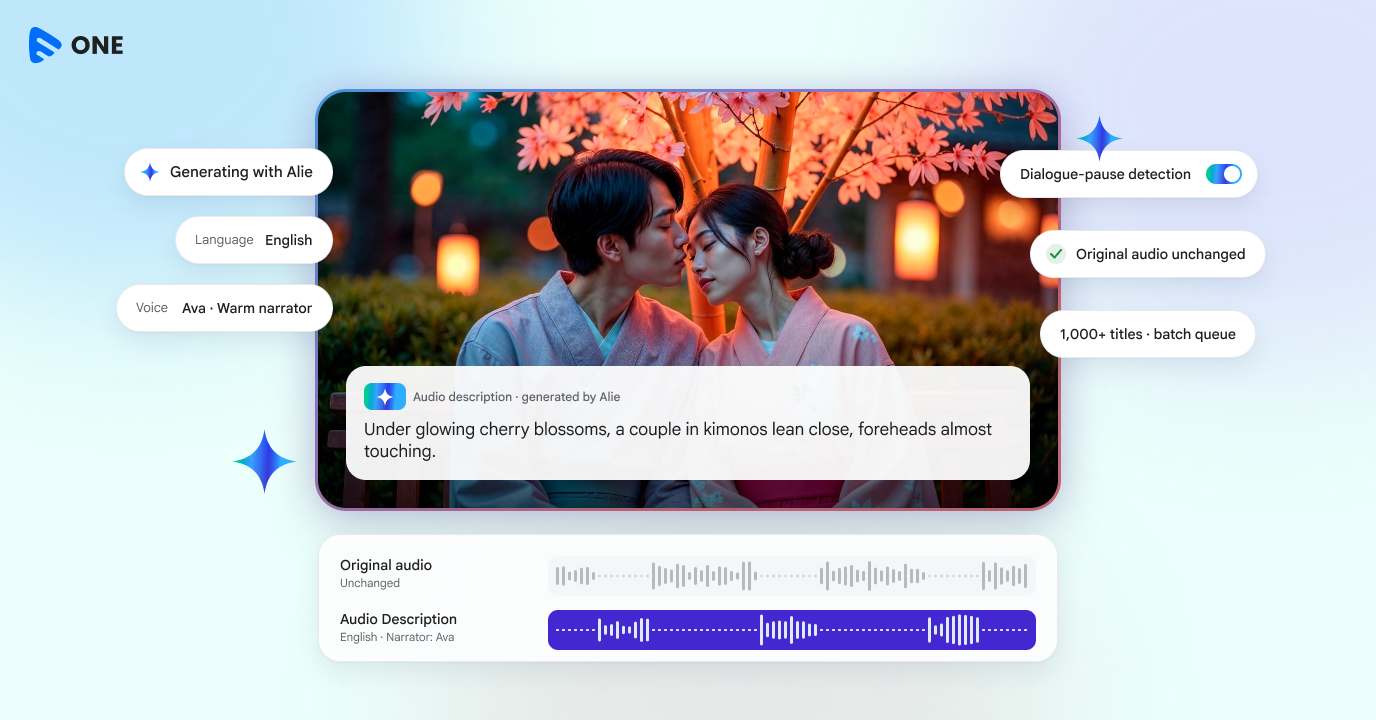
Muvi One’s AI audio description is built for teams that want accessibility in the same place they manage and stream video. Alie analyzes each scene to identify character actions, expressions, locations, objects, scene changes, and on-screen text. It turns that analysis into narration and builds a separate audio description track. Your original audio is not changed.
Lastly, deploying AI audio description is incredibly simple.
- Add your video. Upload a video or select one from the Asset Library, then open Audio Description for that asset.
- Configure. Choose the narration language and narrator voice, and turn on automatic dialogue-pause detection if you want it.
- Generate with Alie. Alie reviews scenes and actions and finds the moments that need description.
- Create the track. Alie generates the narration and adds it as a separate Audio Description track beside the original audio.
Not only that, because audio description sits in the same workflow as hosting, streaming, subtitles, and dubbing, you can handle accessibility, AI subtitles, subtitle translation, and AI dubbing for a title in one place.
If you manage a large library and want to see how it works on your own content, start a free trial or talk to our sales team. You can also explore the wider Alie AI feature set.





Add your comment