A YouTube channel membership lets viewers pay a monthly fee to support a creator and unlock perks such as badges, custom emoji, members-only videos and early access. For creators, it turns loyal viewers into recurring income that does not depend only on ad revenue. Today more and more creators are moving towards better hybrid channels to earn from YouTube and channel memberships are one of the best ways to do it.
This guide explains how YouTube channel memberships work, what they cost and how much of that money you actually keep. Further, we will also look at ways in which you can setup your own exclusive monetization platform using Muvi One and get much better earnings that YouTube.
What is a YouTube Channel Membership
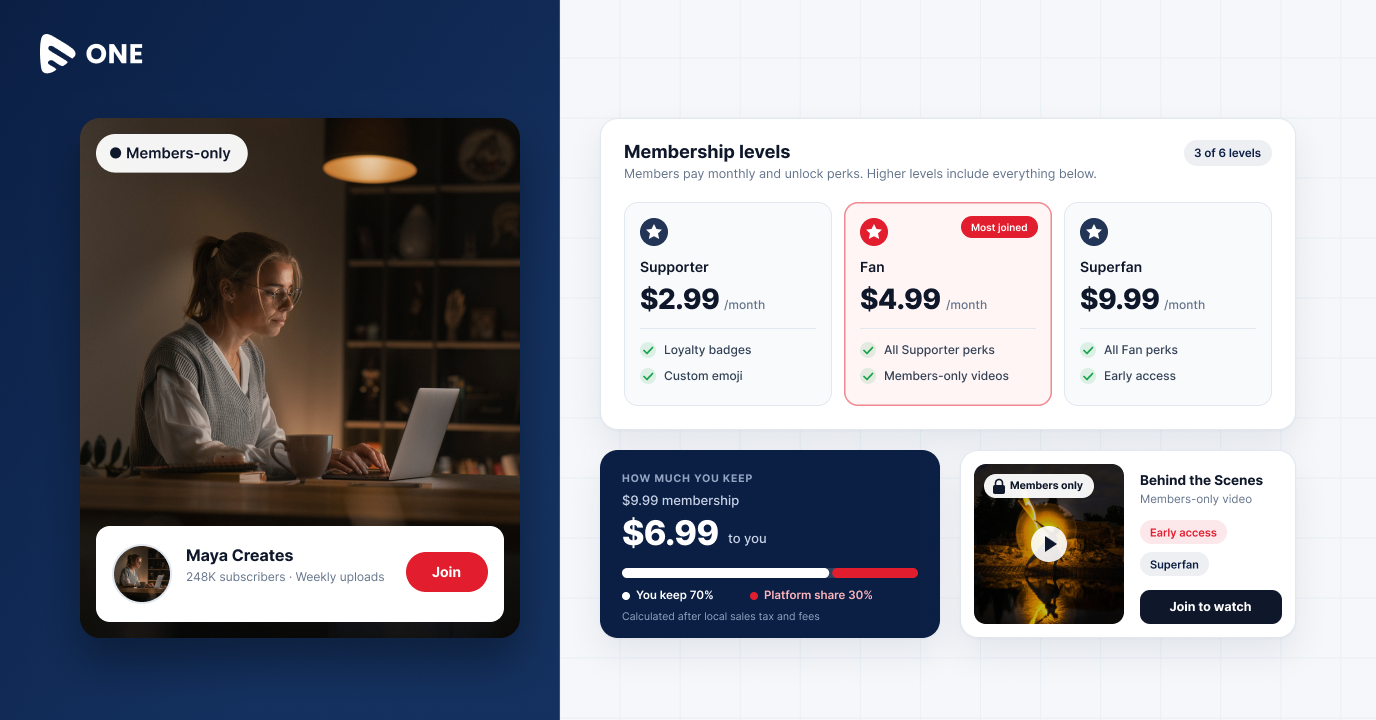
A YouTube channel membership is a paid monthly subscription that viewers buy to support a creator and unlock perks. Members pay a recurring fee at a level the creator sets, and in return they get badges, custom emoji and members-only content. YouTube handles the billing and pays creators their share. It is different from a regular channel subscription. Subscribing is free and only adds the channel to your feed. A membership is a paid, recurring commitment that comes with extras for the people who join.
Members can sign up at any level and upgrade or downgrade whenever they like. Higher levels automatically include the perks of the levels below them, so you never need to list the same perk twice. For the full official description, see YouTube Help on channel memberships.
YouTube Channel Membership Requirements
YouTube channel memberships come with its own set of rules, regulations and commissions. First and foremost, to offer memberships, you need to be enrolled in the YouTube Partner Program and must be above 18 years of age. Just to refresh your memory, lets understand what is YouTube Partner Program in brief.
Partner Program thresholds
YouTube lists the standard route into the Partner Program as 1,000 subscribers plus either 4,000 public watch hours in the last 12 months or 10 million public Shorts views in the last 90 days. Reaching the numbers does not mean automatic entry, because every channel goes through YouTube’s review process. The full rules sit on the Partner Program eligibility page.
YouTube has announced changes to the Partner Program that start on February 1, 2027. If you are reading this after that date, check the current thresholds in YouTube Studio first.
Other Requirements
- You are at least 18 years old.
- You live in a location where channel memberships are available. YouTube lists around 100 countries and regions, including the United States, the United Kingdom, Canada, Australia and India.
- Your channel is not set as made for kids, and it does not have a significant number of ineligible videos. Videos made for kids and videos with music claims both count as ineligible.
- You accept YouTube’s terms and follow its monetization policies.
How to Set Up YouTube Channel Memberships
Open YouTube Studio, go to the Earn section and turn on Memberships. Then create your levels, set a price for each and list the perks. Once you save, a Join button appears on your channel. Menu labels change from time to time, so look for the Earn tab (called Monetization in older versions of Studio).
- Check your eligibility. Confirm that your channel is in the Partner Program and that memberships are available in your location.
- Accept the terms. In YouTube Studio, open Earn, choose Memberships and review the terms.
- Create your levels. You can add up to six. YouTube recommends starting with two or three.
- Set a price for each level. Viewers in other countries see a local price, so the amount may differ slightly by location.
- Add your perks. Choose badges, emoji, members-only posts, live chats and videos for each level.
- Tell your audience. Mention the Join button in your videos and descriptions, and explain what members get.
How Much Does YouTube Takes From Memberships
Creators keep 70% of channel membership revenue, which means YouTube’s share is 30%. YouTube calculates your 70% after local sales tax and other fees, which vary by country and by the platform your member signs up on. YouTube covers payment processing fees, including credit card fees.
Refunds also come out of your share. If a member asks for a refund, YouTube decides whether the claim is valid, and the refunded amount is deducted from your earnings. YouTube explains the details on its billing and payment page for channel members.
Your earnings depend on three things: how many members you have, the price they pay and how long they stay. Only a fraction of your viewers will join, so channels with a strong connection to their audience, regular uploads and clear perks tend to do better. Even 50 members at $2.99 give you over $100 a month in steady income. Memberships add up well alongside ad revenue, Super Chat and sponsorships, and they are one of the few YouTube income streams that repeat every month.
YouTube Channel Membership Limitations
YouTube memberships are a great way to earn from your loyal followers. However, it comes with its share of disadvantages and limitations. Here are some of them.
- Your members depend on your monetization status and countless other rules and regulations defined by YouTube. Needless to say, rules also change and you practically have no control over it.
- There is a limit to the number of membership tier that you can create.
- Most importantly, YouTube takes 30% of the revenue of every dollar paid. YouTube also handles billing and deducts refunds if any from the creator’s share.
None of this stops memberships from being useful. It does raise a question every growing channel faces sooner or later: should all of your recurring revenue depend on a single platform’s rules?
Muvi One Powered Video Membership Site: YouTube Memberships Alternative
A video membership site is your own branded website and apps where viewers pay a subscription to watch your content. You set the price, choose the content and collect payments through your own payment gateway account. When your business grows, it is always advisable to own your content’s user journey. YouTube memberships lack that. They can close any day or change rules on engagement or money tomorrow and you won’t be able to do a thing about it.
So what is the solution?
Muvi One can help you build your very own video membership website and apps that are fully white-labelled and seamless payment gateway integration. The entire setup is no-code so you do not need to write a single line of code and our team of engineers ensure that your membership platforms work as advertised.
Here is a side by side comparison:
| | YouTube channel membership | Your own video membership site |
|---|
Revenue share | YouTube keeps 30% | No Muvi revenue share. Payment gateway fees apply |
Pricing | Up to six levels. One price change per level every 12 months | You choose your plans and prices. Coupons and vouchers are available on Muvi One Professional |
Branding | YouTube’s player and channel page | White-labeled website and mobile apps on your own domain |
Billing | YouTube charges members and handles refunds | Payments go through your connected gateway account |
Content rules | No downloads or prize draws as perks | Subscription, pay-per-view or ad-supported videos behind your own paywall |
Discovery | Strong. YouTube search and recommendations bring new viewers | You bring the audience, often from your YouTube channel |
Platform risk | Memberships pause if monetization is lost | Your site does not depend on your YouTube monetization status |
Muvi One Backed Video Membership Site Features
Muvi One is an all-in-one OTT platform for launching and running a branded video service. For a creator moving beyond YouTube memberships, these are the features that matter most.
- A white-labeled website and mobile apps. Launch on your own domain with your own branding. Viewers see no mention of Muvi. The Standard plan includes one website or app, and additional apps are priced per app.
- Subscriptions, pay-per-view and ads. Muvi One supports subscription (SVOD), pay-per-view (TVOD) and ad-supported (AVOD) models, so you can mix a monthly membership with one-off premium releases.
- Your own payment gateways. Connect gateways such as Stripe, PayPal and Braintree. Payments go through your connected gateway account, and Muvi’s payment gateway page states that Muvi takes no revenue share. Professional plans add support for multiple gateways, so you can accept payments across different markets.
- Coupons, vouchers and multi-currency pricing. Professional plans include all three. A coupon code is a simple way to turn YouTube viewers into paying members with a launch offer.
- DRM and security. DRM protection is included on the Standard plan. Professional adds watermarking, geo-blocking and domain restrictions, which helps protect premium videos behind your video paywall.
- Analytics. See how your audience watches and which content keeps them subscribed.
YouTube or Own Membership Website: Which is Better
The correct answer is, you do not have to choose one of them. YouTube is clearly one of the best places to get discovered but your own website is where you gain maximum from your loyal followers who are willing to pay a premium.
YouTube channel memberships are a quick way to start earning from your audience. You keep 70% of each payment, YouTube handles billing, and your viewers can join in a click. For a channel with a small but growing community, that is hard to beat.
As your community grows and your prices rise, running your own video membership site becomes the stronger choice. You keep more of every payment, set your own plans and build a service that carries your brand. Many creators run both: YouTube for discovery and their own site for their most dedicated fans.
Muvi One can help you build you own video membership website and applications. Get a free 14-day trial today.








Add your comment