A cinematic banner on a smart TV, a square thumbnail on Instagram, a vertical story on mobile — each one needs a different version of the same image. Doing this by hand takes hours. AI auto cropping changes that. It reads your image, finds what matters, and creates perfectly composed crops for every format automatically. Read this blog to find out the details of AI image cropping and how to achieve it in a few clicks with Alie AI.
What Is AI Auto Cropping?
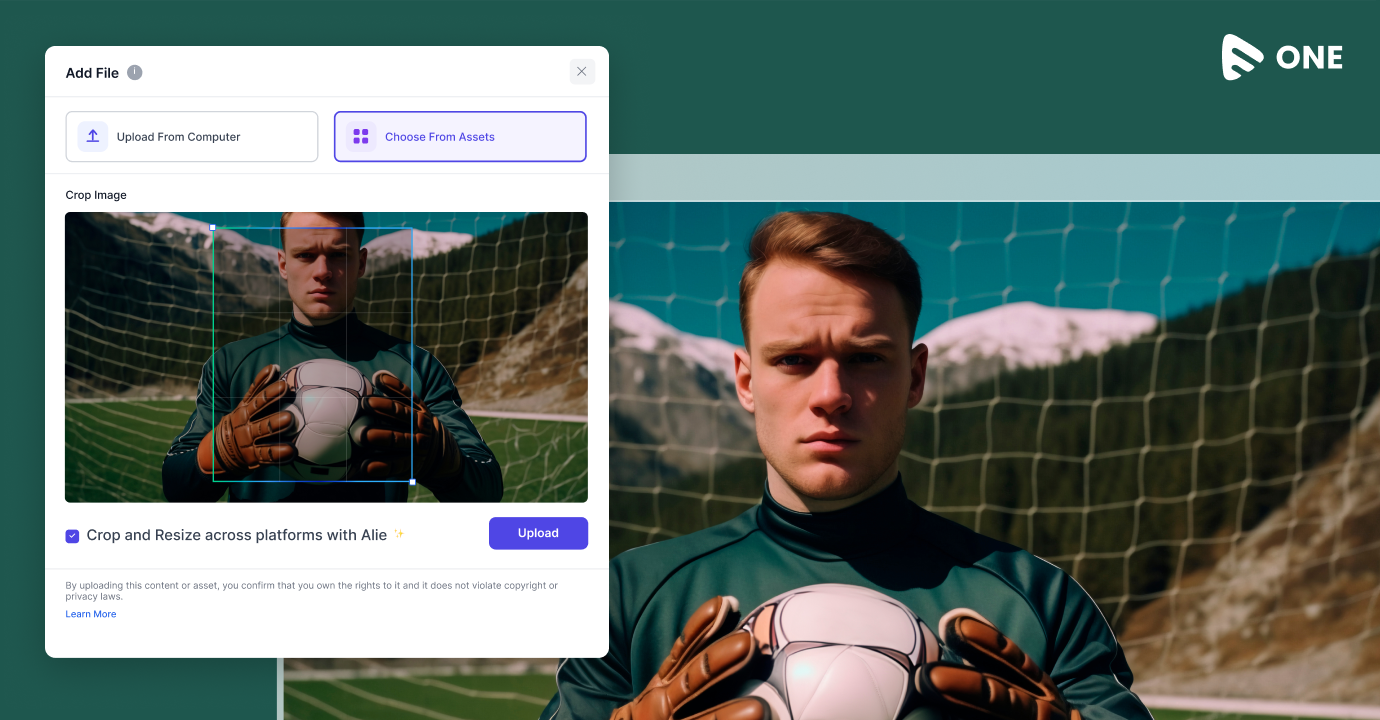
AI auto cropping is a technology that analyzes an image and automatically generates cropped versions suited to different aspect ratios and screen sizes. It uses computer vision to detect the most important subject in a frame — a face, a character, a logo, a focal point — and keeps that subject centered and visible across every crop.
Traditional cropping cuts from fixed edges. AI auto cropping thinks. It understands where the action is happening, which part of the image carries the most visual weight, and how to reframe the shot so that nothing important gets lost when the canvas changes shape.
12+ Aspect ratios per asset | 90% Faster than manual editing | 100s Assets processed per minute |
Alie AI is built for exactly this challenge. It handles AI auto cropping for media teams — generating broadcast-ready, platform-optimized image variants from a single master asset. No manual resizing. No back-and-forth with design. Just clean, accurate crops delivered at scale.
Why One Image Is Never Enough
A video streaming platform might need a 16:9 hero banner, a 2:3 poster card, a 1:1 app icon thumbnail, and a 9:16 vertical preview — all from the same show artwork. A social media team needs square posts, wide Twitter cards, and tall Stories. A broadcast graphics department needs clean 4:3 and 16:9 versions for different regions and devices.
Each of these crops has to look intentional. The subject has to be visible. The composition has to hold. Getting this right manually, for hundreds of titles or campaigns, is a massive production bottleneck.
OTT / Streaming 16:9, 2:3, hero banners | Mobile 9:16, 4:5, app tiles | Social Media 1:1, Stories, Reels | Broadcast TV 16:9, 4:3, lower thirds |
How AI Auto Cropping Works
The process starts with subject detection. The AI scans the image and identifies faces, bodies, objects, or scenes that carry the most meaning. It assigns a focal point — the part of the image that should always stay visible, no matter how the frame changes.
From there, the system calculates the optimal crop window for each target aspect ratio. It moves and scales the frame around the focal point, keeping the subject intact while adapting to the new canvas. For images with multiple subjects, it balances the composition intelligently.
- Upload the master image in full resolution
- AI detects faces, subjects, and focal regions
- Focal point is set — automatically or manually confirmed
- System generates crops for every target format
- Outputs are ready for delivery across platforms
Alie AI runs this entire pipeline automatically. Upload a master image, define your output formats, and Alie delivers every crop with smart focal detection. It supports OTT metadata standards, broadcast aspect ratios, and social platform specs — so your team spends time approving, not resizing.
AI Auto Cropping For OTT And Streaming Platforms
Streaming platforms are the highest-volume consumers of image variants. A single show title might need a hero background, a title treatment card, a horizontal thumbnail, a vertical poster, and multiple localized versions. Multiply that by hundreds of titles in a catalogue and the production scale becomes enormous.
AI auto cropping fits directly into content operations workflows. As metadata is finalized and artwork is approved, the crop pipeline runs automatically — generating every required variant and tagging them correctly for the content management system. Teams get broadcast-ready assets without a separate design pass.
OTT platforms also have strict guidelines about where text and logos can appear. Smart cropping systems understand these constraints and keep important graphic elements within the safe zone across every format.
Cropping For Mobile And Vertical Formats
Mobile-first viewing has made vertical and portrait formats essential. The 9:16 aspect ratio — used in Instagram Stories, TikTok, YouTube Shorts, and mobile app interfaces — is now a primary delivery format for many content teams.
Vertical crops from landscape source images are the hardest to get right manually. AI auto cropping solves this by identifying the subject and reframing around it, rather than just cutting from the center.
Mobile app tiles, splash screens, and notification banners each have their own dimensions. AI cropping handles all of them in a single automated pass.
Alie AI is built with mobile delivery in mind. It generates 9:16 verticals, app tile formats, and mobile-specific crops alongside every other platform variant — all from the same source image, in the same workflow. Your OTT and mobile assets come out of the same pipeline, consistent and ready.
Broadcast TV And The Challenge Of Frame Accuracy
Broadcast has its own set of requirements. Standard definition, high definition, and ultra-high definition each use different aspect ratios. Graphics overlays, lower thirds, and on-screen text all occupy specific regions of the frame. Images used in broadcast need to respect those zones precisely.
AI image cropping for broadcast understands title-safe and action-safe areas. It keeps the focal subject inside the broadcast-safe region and avoids placing important content in the over scan zone — the edge area that older televisions would cut off. This means graphics teams can automate asset preparation without worrying about manual safe-zone checking on every image.
Social Media Cropping At Scale
Social media teams work with the widest range of crop requirements. Instagram posts are square or portrait. Twitter cards are wide. Facebook cover images are ultra-wide. Pinterest is tall. Stories and Reels are vertical. Each platform has its own image spec.
AI auto cropping removes the per-platform manual work. A single upload generates every social variant automatically. For campaigns running across five platforms simultaneously, that is the difference between a two-hour design task and a two-minute export.
Alie AI keeps your social assets consistent and on-brand at every size. Campaign images, show artwork, and promotional graphics all get the same intelligent crop treatment — so your Instagram square, your Twitter card, and your Story all look like they were art-directed for that exact format.
Read More:
How to Launch Microdrama App like Dramabox
How to launch A Vertical Video App
How to Build an App Like Reelshot
How to Build an App like Dramawave
What To Look For In An AI Auto Cropping Solution
Strong subject detection matters most. The system has to correctly identify the focal point across a wide range of image types, including illustrated artwork, dark-themed imagery, and crowded compositions.
Platform coverage is the second factor. A useful solution supports every format your team needs to deliver — OTT specs, broadcast standards, social media sizes, mobile dimensions — and keeps those specs updated as platforms change.
Workflow integration is the third. AI auto cropping delivers the most value when it runs inside your existing content operations pipeline, connected to your DAM, CMS, or broadcast playout system — not as a standalone tool that requires a separate upload step.
WHY ALIE AI CHECKS EVERY BOX
Alie AI was built for media and entertainment workflows from the ground up. It combines accurate AI subject detection, a comprehensive library of platform and broadcast specs, and API-first integration that connects directly to the systems your team already uses. It is the infrastructure layer for intelligent image operations at scale.
The Bottom Line
AI auto cropping is a production capability that every media team working across multiple screens and platforms needs. It replaces repetitive manual resizing with intelligent, automated image preparation — keeping subjects in frame, respecting platform specs, and delivering consistent results at any volume.
For OTT, broadcast, mobile, and social — the format landscape is only getting more complex. AI auto cropping is how modern media operations keep up.
Try Alie AI free for 14 Days and get better clarity!




Add your comment