Somewhere between your first hundred subscribers and your first ten thousand, a decision you made early — the one about where your platform actually runs — starts pushing back. Most OTT platforms launch on shared or multi-tenant cloud infrastructure. It’s cheaper, it’s fast to set up, and for a catalog of a few hundred titles and a modest concurrent audience, it does the job without complaint.
Then the audience grows. A marketing push lands better than expected. A live premiere pulls in a spike you didn’t plan for. And suddenly the platform that used to feel fast starts stuttering — not because your content or your CMS changed, but because the infrastructure underneath it was never built to scale with you alone. It was built to scale with everyone sharing the rack.
This is the point where OTT infrastructure scalability stops being a checkbox on a vendor comparison sheet and starts being the thing standing between you and your next thousand subscribers.
This post is for teams already running some form of shared or cloud-based OTT hosting who are starting to feel the ceiling — and want to understand, in concrete terms, what a dedicated server changes and when it’s actually worth the move.
The Shared Infrastructure Trap: Why It Works Until It Doesn’t
Shared infrastructure is not a bad decision — it’s usually the right one at launch. Multi-tenant cloud environments split compute, storage, and bandwidth across many customers on the same physical hardware. That shared cost structure is exactly why entry-level OTT plans can be priced the way they are.
The trap isn’t in choosing shared infrastructure. It’s in staying on it past the point where your traffic patterns stop looking like everyone else’s. Early on, your usage is low enough that you never bump into the limits of what you’re sharing. As your concurrent viewership climbs, as your catalog grows, and as you start layering in 4K delivery, DRM, or live simulcasts, you start competing for the same finite pool of CPU, RAM, and network throughput as every other tenant on that server.
You don’t see this competition in your dashboard. You see it as slower page loads, longer buffering wheels, and support tickets that say “it worked yesterday.”
Read more: Empowering Streaming: 8 Must-Try Features of Muvi One
Signs Your OTT Platform Has Outgrown Shared Hosting
A few patterns tend to show up before teams make the move to dedicated infrastructure:
- Buffering or playback degradation that correlates with time of day rather than your own traffic
- Concurrent user limits you’re bumping against during premieres or live events
- Support tickets about slow load times that your own monitoring can’t explain
- A growing catalog that’s pushing storage and encoding demands past what your current plan comfortably handles
- Compliance or data residency requirements (healthcare, education, government, finance) that shared, multi-tenant environments can’t easily satisfy
- A need for server-level customization — custom firewall rules, specific software configurations — that a shared environment simply doesn’t allow
None of these show up as a single dramatic failure. They show up as a slow erosion of trust, one buffering wheel at a time.
What Actually Changes With a Dedicated Server
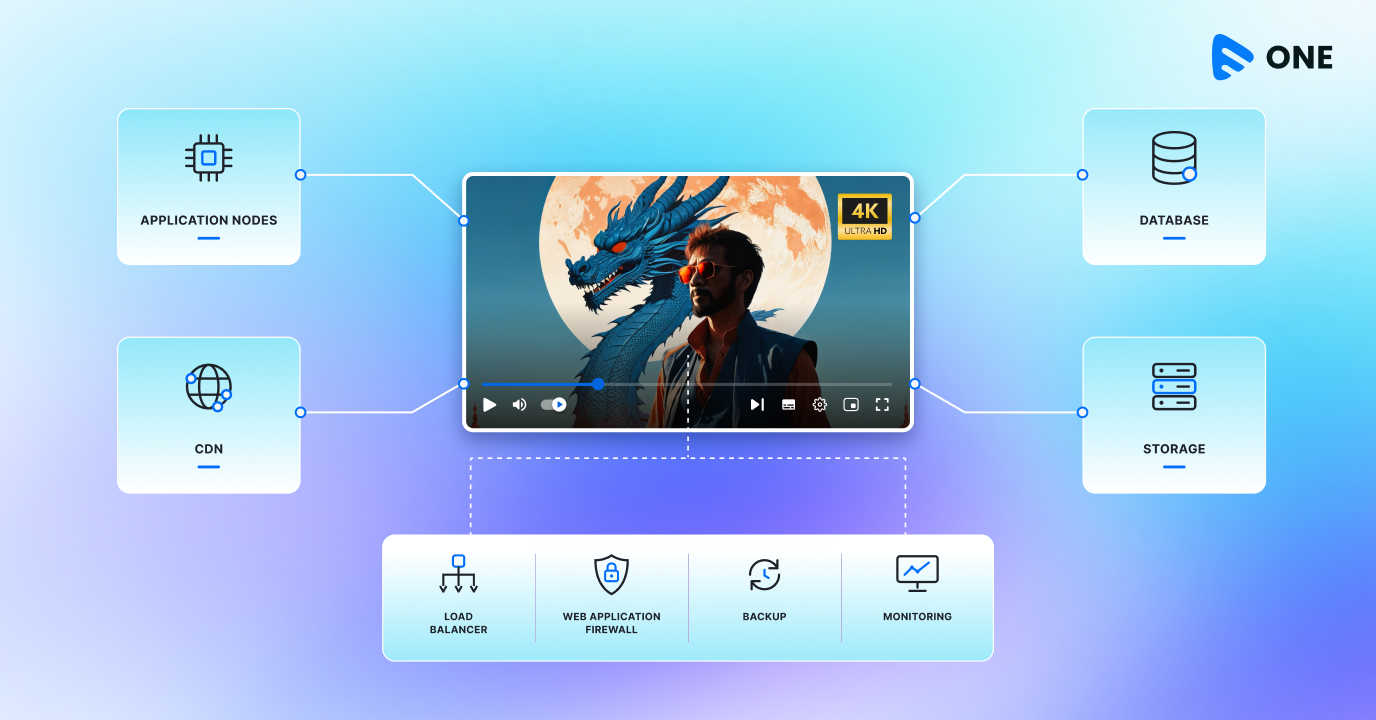
A dedicated server gives your platform exclusive use of the hardware it runs on — the CPU, RAM, storage, and network capacity aren’t split with anyone else. That single change has a few concrete downstream effects worth understanding before you decide it’s worth the upgrade.
Performance becomes predictable. Because you’re not competing for resources, your platform’s load times and streaming quality stop fluctuating with a stranger’s traffic. What you provision is what you get, every hour of every day.
Traffic spikes stop being a liability. A dedicated server absorbs sudden surges in concurrent viewers — a live event, a viral clip, a marketing campaign that overperforms — without the resource contention that causes shared environments to degrade under load.
Security and control increase. With sole use of the server, you can configure firewalls, intrusion detection, and security protocols specific to your platform, instead of inheriting the baseline configuration of a shared environment.
Compliance gets easier to demonstrate. Data residency and industry-specific compliance requirements — common in healthcare, education, finance, and government streaming — are far easier to satisfy when you can point to infrastructure that isn’t shared with unrelated tenants.
You get a dedicated IP. This has knock-on benefits for email deliverability, SEO, and SSL certificate management that shared IP pools don’t offer.
Muvi One Enterprise: Solves OTT Infrastructure Scalability
Muvi One’s Standard and Professional plans run on shared cloud infrastructure with a built-in Amazon CDN — a solid foundation for platforms in growth mode, supporting up to 1,000 and 5,000 concurrent users respectively at 99.9% uptime. It’s the Enterprise plan where infrastructure changes shape: Muvi One Enterprise includes a dedicated server as a core part of the plan, alongside support for up to 50,000 concurrent users and 99.99% uptime.
That dedicated server on Muvi One Enterprise comes with the benefits outlined above — full CPU, RAM, and storage exclusively for your platform, protection from the “bad neighbor” effect, custom firewall configuration, and a dedicated IP. It’s paired with other enterprise-tier infrastructure features: a staging environment to test changes before they go live, lossless and per-title encoding, role-based access control, enterprise SSO, and custom analytics reporting — the kind of feature set that assumes you’re running a platform at a scale where reliability isn’t optional.
For platforms that outgrow even Enterprise, Muvi One Ultimate goes further with custom CDN and storage architecture, multi-CDN support, disaster recovery, and custom firewall rules built around your specific compliance requirements.
Read more: What Muvi One Enterprise Plan Offers for Video Streaming
Making the Move: What to Expect
Moving from shared to dedicated infrastructure isn’t a same-day switch, but it’s also not the disruptive migration many teams expect. The practical steps typically include:
- Auditing current usage — concurrent viewership, storage growth, and encoding load over the past two to three quarters to size the right dedicated configuration
- Mapping compliance needs — if you operate in healthcare, education, finance, or government, document the data residency and security requirements a dedicated environment needs to satisfy
- Planning the cutover window — ideally scheduled outside peak viewing hours or major content launches
- Validating in staging first — testing performance and configuration changes before they touch live traffic
Platforms that treat this as a planned infrastructure upgrade — rather than an emergency response to a bad premiere — tend to make the switch with the least friction and the fewest surprises for subscribers. Understand Muvi One pricing to decide the best option.
Shared infrastructure isn’t a mistake. It’s a starting point. The platforms that struggle aren’t the ones that launched on shared hosting — they’re the ones that stayed on it past the point where their audience, catalog, and compliance needs had already outgrown it. If buffering, concurrent user caps, or compliance gaps are starting to show up in your support queue, that’s usually a sign your OTT infrastructure scalability plan needs to catch up with your growth, not the other way around.
If you’re already evaluating what a dedicated server would mean for your platform, Muvi One Enterprise is built around exactly that transition: dedicated infrastructure, enterprise security, and the concurrent user headroom to handle growth without the noisy neighbor problem. Explore Muvi One’s pricing and plans, or start a free trial to see the difference in your own environment. |










Add your comment