Some content has moments that stop families from watching together. A single scene — a few seconds of nudity, graphic violence, or sexual content — can make an otherwise great show uncomfortable to watch with kids, parents, or colleagues. For streaming platforms, that friction is a real audience problem. The traditional fix is to produce a separate edited version of the video. That costs time, storage, and an ongoing management overhead every time content gets updated.
SafeWatch eliminates that trade-off. It is a new Muvi One feature that lets viewers skip sensitive scenes during playback — without any editing, re-encoding, or duplicate video files. The original video stays exactly as it is. SafeWatch handles the skipping at the playback level, invisibly, and only when the viewer chooses to use it.
What Is AI SafeWatch?
SafeWatch is a playback feature built into Muvi One that gives your viewers two ways to watch the same video: standard playback, or a safer mode where admin-approved sensitive scenes are automatically skipped. When a viewer selects “Watch with SafeWatch” on an eligible video, playback proceeds normally — until it reaches a scene flagged for skipping. At that point, SafeWatch moves playback forward to the next unrestricted moment. No manual fast-forwarding, no interaction required from the viewer.
The most important thing to understand about SafeWatch is what it does not do. It does not edit the video. It does not re-encode the file. It does not create a second copy of your content. SafeWatch works entirely at the playback level, which means your storage footprint stays the same and your original file remains intact regardless of which mode a viewer chooses.
How AI Detects Sensitive Scenes in Your Video Library
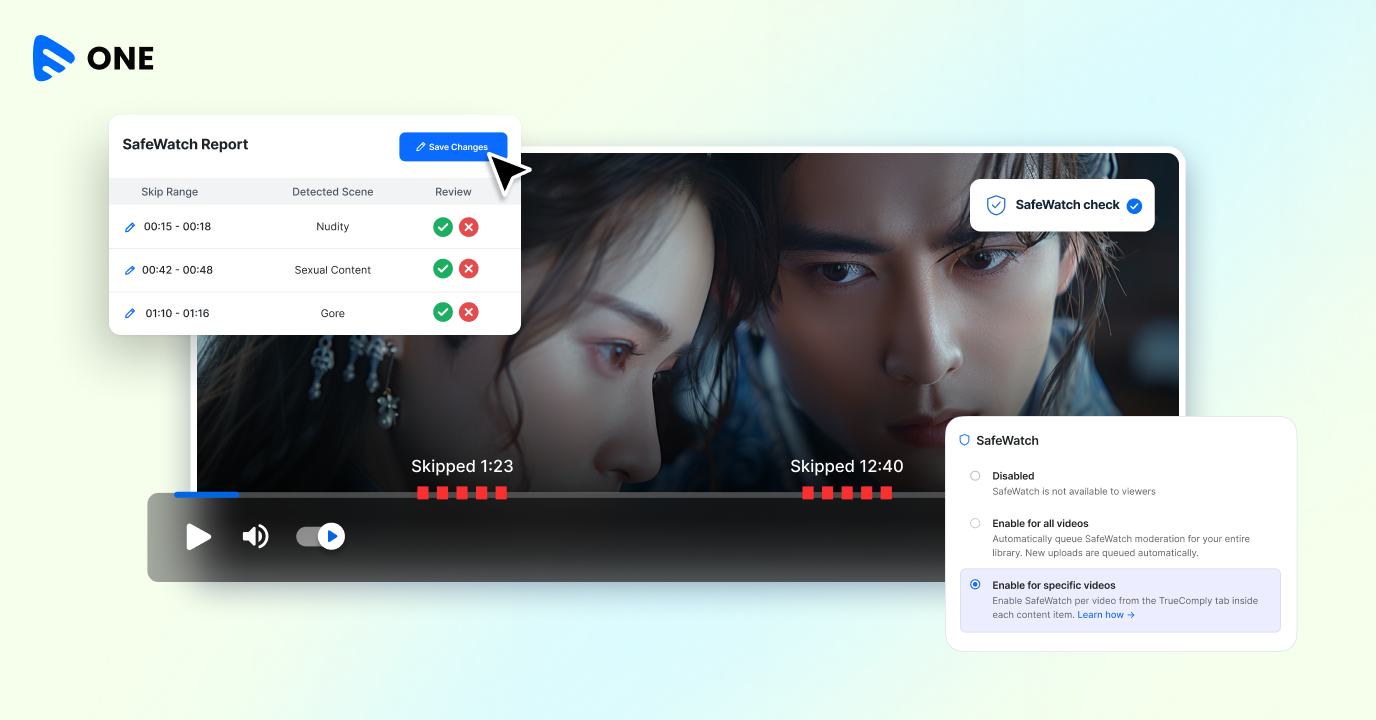
SafeWatch does not work alone. It integrates with TrueComply, Muvi’s AI-powered video compliance solution, to identify sensitive scenes and generate the timestamps SafeWatch needs. TrueComply uses its scene detection and analysis for streaming platforms to scan your video library and locate moments containing nudity, sexual content, or graphic violence. Once the analysis is complete, it produces a moderation report with precise start and end timestamps for each detected scene.
Those timestamps are what SafeWatch reads during playback. When playback reaches a flagged timestamp in SafeWatch mode, the player automatically skips forward to the next approved point. The viewer experiences a seamless transition — they stay in the story without the sensitive moment.
Admins review and approve detections before anything goes live. TrueComply surfaces what it finds; admins decide which scenes and timestamp ranges are actually approved for skipping. If your content policies change, you can update the SafeWatch profile, rerun it, and the new report becomes the active version. SafeWatch applies the latest approved timestamps going forward.
What SafeWatch Can Skip — and Who Decides
The default SafeWatch profile covers three categories of sensitive content that are detected and timestamped by TrueComply’s AI scene detection for video analysis:
Nudity — scenes containing nudity or other NSFW visual content.
Sexual content — scenes containing sexually explicit material.
Gore — scenes containing graphic or violent imagery.
Admins can review each detection individually and choose which scenes to approve. If your platform serves a specific audience — a faith-based community, a family entertainment service, an enterprise training portal — you define the threshold. Not every platform has the same standards for what counts as skippable, and SafeWatch does not impose one. You control the profile and what viewers skip.
Enabling SafeWatch works at two levels: library-wide or per video. If you turn it on across your full library, Muvi One automatically queues every new upload for SafeWatch analysis. Large catalogs or platforms with high content volume benefit from this approach — you set it once and the pipeline handles the rest. For platforms where only a portion of the library contains sensitive material, per-video control lets you be more selective about what gets analyzed and what does not.
SafeWatch Use Cases
The most obvious use case is family viewing. Parents who want to watch a film or series alongside their children, but know there are scenes that make that uncomfortable, now have a platform-native solution — not a workaround, and not a separate streaming service. SafeWatch keeps those viewers on your platform instead of sending them elsewhere.
Beyond families, shared-screen viewing is a real scenario for many audiences. Watching something at work, with extended family, or in group settings becomes easier when viewers know they can engage SafeWatch mode for content with occasional sensitive moments. Religious and faith-based communities, health and wellness platforms, and educational OTTs all serve audiences who want this kind of viewer control.
Get Started with SafeWatch on Muvi One
Sensitive content filtering for streaming does not have to mean editing your library or storing duplicate video files. SafeWatch handles it during playback, TrueComply handles the detection, and your viewers get the choice they are looking for — all from within your existing Muvi One platform.
SafeWatch is available now on Muvi One. You can enable it library-wide or for selected videos, control exactly which scenes and timestamp ranges are approved, and offer viewers a family-friendly streaming mode without changing a single frame of the original content. Start your free Muvi One trial to explore SafeWatch and the full suite of AI-powered features built for modern streaming platforms.








Add your comment