Twitch changed how people consumed live content on the internet. It made live streaming a daily habit for millions of people both as a streamer and as a consumer. According to recent metrics from Streams Charts and TwitchTracker, Twitch viewers watched 1.6 billion hours of live streams over the past 30 days (October 10 – November 8, 2026), reaching a peak of 4,407,896 concurrent viewers. Such massive numbers indicate that live streaming is one of the most popular forms of streaming.
However, there is one key question. Is there something that is better than Twitch. This blog talks about that. Comparing the various popular Twitch alternatives so that you can make an informed choice. Selecting a live streaming platform can be a confusing task.
Some platforms give you a bigger share of the revenue. Some give you a larger built-in audience. Others give you a branded platform you fully control, which matters if you run paid events, courses, sports or corporate broadcasts. This guide compares 10 streaming platforms like Twitch, so you can match each one to your goal.
Why Look for Twitch Alternatives
Twitch is one of the largest communities of live streamers, particularly in the gaming genre. However, there are several reasons why Twitch is becoming a restriction as brands and people grow on the platform. Here are a few reasons why Twitch fails to deliver for high-performance accounts.
- Revenue share. Twitch’s standard subscription split is 50/50. Its Plus Program can improve that for qualifying streamers, but many creators still compare it with platforms that advertise more. Kick advertises a 95/5 subscription split, and YouTube pays creators 70% on Super Chat and memberships. So as far as money is concerned, Twitch lags.
- Discovery. New streamers compete with a huge catalog of channels, and few get found. Other platforms surface live content differently, especially mobile-first apps such as TikTok.
- Branding and control. Your channel lives inside Twitch’s design, rules, and recommendations. Brands can’t white-label the experience or move viewers onto their own site and apps.
- Business needs. Twitch is built around public, community-driven channels. Paid tickets, private events, content protection, and enterprise security controls call for a different kind of platform.
- Platform rules. Policies change, and creators have limited say. A second home reduces that risk.
So these were a few reasons why we believe that certain accounts need an upgrade and the next key question is how does one decide the upgrade. The rules vary and depend on your requirements. For example, many Twitch streamers keep their Twitch account but host their PPV content on their own custom-built platform, controlling monetization, the front end, and everything that comes in between.
Twitch Alternatives: 10 Best Options to Choose From
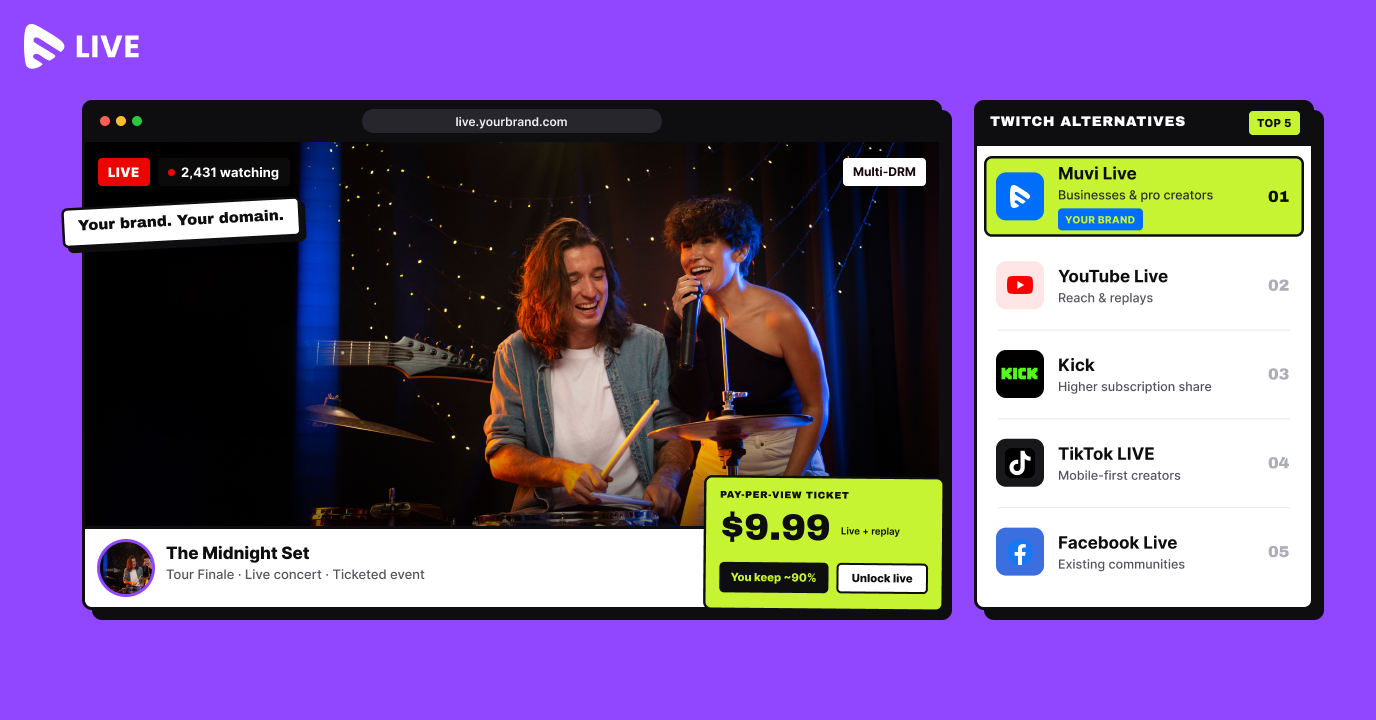
Muvi Live: Best Live Streaming Solution for Businesses and Professionals
Muvi Live is a live streaming platform that lets you stream, protect and sell access to your events under your own brand. Instead of renting space on someone else’s channel, you run the broadcast on your own white-labeled website and apps, with a built-in paywall and ad support.
That makes it a different kind of Twitch alternative. Twitch brings you an audience and keeps a large share of subscription revenue. Muvi Live gives you the platform and most of the revenue, and you bring the audience. If you already have followers, customers, members or fans, that trade can pay off quickly.
Key Features
- Built-in paywall. Sell pay-per-view access in 135+ currencies with instant payouts, and keep about 90% of the revenue.
- Ads. Insert VAST ads from your own ad server and use SCTE-35 ad markers.
- Content protection. Multi-DRM (Widevine, PlayReady and FairPlay) protects your streams. Watermarking, geo-blocking and domain restrictions come with the Professional plan and above, and you can also password-protect live streams.
- White-label branding. Your logo, your domain, your website and apps, with no Muvi branding.
- Flexible ways to go live. Use encoders such as OBS, vMix, Wirecast, Haivision and LiveU, stream from the Muvi Live mobile app on iOS and Android, or go live from a browser with webcam and screen sharing.
- Recording and replays. Record live streams and turn them into on-demand content.
- Analytics and developer tools. Track concurrent viewers, watch time, geography and retention, connect data to BI tools such as Power BI and Tableau, and build with APIs, SDKs and webhooks.
- Simulcasting. Send your event to social platforms such as YouTube and Facebook while your core audience watches on your own platform.
- Enterprise controls. The Enterprise plan adds SSO, role-based access control, audit logs, a dedicated server, and 99.99% uptime.
Pricing
Muvi Live plans start at $99 a month, and yearly billing saves 20%. Every plan includes pay-per-view monetization, no setup fee and 24×7 support. Plans include a monthly allowance of bandwidth and streaming hours, and usage beyond that is billed at published rates. A 14-day free trial needs no credit card. See the full Muvi Live pricing for current details.
Muvi Live Vs Twitch: A Brief Comparison
| | Twitch | Muvi Live |
|---|
How you earn | Subscriptions, Bits and ads. The default subscription split is 50/50. | Pay-per-view paywall and ads. You keep about 90% of paywall revenue. |
Audience | Large built-in community | You bring your own audience |
Branding | Your channel lives on Twitch | White-label website and apps under your brand |
Viewer relationship | Stays with the platform | Lives on your own site and apps |
Content protection | Built for public viewing | Multi-DRM, password protection, plus watermarking and geo-blocking on higher plans |
Cost to start | Free | From $99/month plus usage; 14-day free trial |
YouTube Live: Great Way to Expand Reach
YouTube puts livestreamers on the biggest video audience on the internet. It’s free, and it suits creators who care about reach above everything else. It is best for creators who are looking for ways to build up an audience and need all the views that they can possibly get. This Twitch alternative is mostly free and suits creators looking for a large audience waiting to be captured.
Features
- Easy setup. Go live from a phone, a webcam or an encoder, with resolutions up to 4K.
- Ways to earn. Super Chat, Super Stickers and channel memberships pay creators 70%, and ads are available through the YouTube Partner Program.
- Replays. Streams stay on your channel as videos that show up in search and recommendations.
Pricing
It’s free but works only after you cross a certain threshold of subscribers.
Kick: Best Possible Subscription Split
Kick launched as a creator-friendly rival to Twitch and has grown quickly, helped by high-profile streamer signings. Its main draw is the revenue split, and the layout will feel familiar if you’re coming from Twitch. For streamers who want a larger share of subscription revenue and a Twitch-style experience, Kick is where you put your time and money.
Features
- Subscription split. Kick advertises a 95/5 split on subscriptions, and it has described the 5% as a processing fee.
- Familiar tools. Live chat, subscriptions, tips and clips work much like they do on Twitch.
- Quick start. Subscriptions unlock after a short streaming history, which Kick’s help guide puts at five total hours.
Pricing
Users can create subscription tiers as per their requirements
TikTok Live: Best for Mobile-First Creators
If you are making short videos and that is how you want to market your content further, TikTok Live is one of the best platforms to build your content on. Your short-form audience can follow you into a live stream, and viewers support you with gifts instead of subscriptions.
Features
- Discovery. Live streams can reach people through the same feed that surfaces your short videos.
- Gifts. Viewers send virtual gifts that convert to Diamonds, which eligible creators can cash out.
- Phone-first. Go live straight from the app.
Pricing
TikTok Live pricing involves virtual coins, gift values, and creator subscription tiers rather than a single platform entry fee
Facebook Live: Great for Existing Communities
Facebook Live is a solid pick when your audience already lives on Facebook, whether that’s a Page, a Group, a local community, or customers who follow your brand. Facebook retired its standalone gaming app in 2022, so think of it as a general live video tool rather than a gaming hub. Best for community builders, local businesses, churches, and brands with an existing Facebook following.
Features
- Where you can go live. Stream to a Page, a Group or your profile, and promote it with scheduled events.
- Sharing. Viewers can comment, react and share the stream with their own networks.
- Monetization. Tools such as Stars are available to eligible creators, and availability varies by region and account type.
Pricing
Free
Rumble: Best for Long-Form Shows
Rumble is a video platform with live streaming, a creator program and its own streaming tool, Rumble Studio. It appeals to long-form hosts who want an alternative to the larger platforms.
Best for hosts of long-form shows, commentary and talk streams who want another home for their content.
Features
- Rumble Studio. Browser-based live streaming with multi-streaming, guest tools, and combined chat.
- Revenue. Creators can earn through ad revenue sharing and Rumble Premium, and the creator program sets monthly streaming targets.
- Replays. Live streams save as videos on your channel.
Pricing
Free, but has optional paid subscriptions
Vimeo Live Stream: Branded Events Made Simple
Vimeo Livestream is built for businesses that want a clean, branded broadcast for webinars, events, and town halls. It sits closer to Muvi Live than to Twitch: you stream to an audience you bring, not one the platform finds for you. These platforms like Vimeo and Muvi Live give you the best streaming experience technology can provide, but the audience has to be yours.
Hence, you gain an audience using free platforms and then go pro to give a better experience to your paid audience.
Features
- Business-friendly presentation. A clean player you can embed on your own site.
- Tied into Vimeo hosting. Live events and on-demand videos live in the same account.
- Plans for teams. Pricing is plan-based, so compare current tiers on Vimeo’s site.
Pricing
Vimeo live streaming requires the Vimeo Advanced plan or a custom Enterprise plan, as live broadcast and webinar features are not included in lower tiers
Dacast: Built for Small Paid Streams
Dacast is a live streaming and video hosting platform aimed at small and mid-sized businesses. It offers a paywall, ads and embeddable players, so it competes directly with Muvi Live.
Best for small businesses, fitness studios, faith groups and media teams that want pay-per-view with a simple setup.
Features
- Monetization. Paywall and ad options, with some features depending on your plan.
- Embeddable players. Put your streams on your own site.
- Entry price. Several 2026 listings show plans starting around $39 a month, with bandwidth and storage overages billed on top.
Restream: Best for Multistreaming
Restream isn’t a destination like the others. It’s a multistreaming tool that sends one live video to many platforms at once, including Twitch, YouTube, Facebook, and Kick. Restream says it works with more than 30 platforms.
Best for creators who want to reach audiences on several platforms without managing separate streams.
Features
- One stream, many destinations. Connect your channels once and go live everywhere.
- Browser studio. Add guests, layouts, and a combined chat view.
- Free plan and paid tiers. The free plan covers two destinations and adds Restream branding. Paid plans listed in 2026 start at around $19 a month.
Pricing
Paid plans start at US$ 19 per month
LinkedIn Live: First Choice for B2B Brands
LinkedIn Live fits B2B brands, consultants, and executives who want to broadcast to a professional audience. The payoff is usually leads, hiring, and credibility rather than direct stream revenue.
Features
- Professional audience. Broadcast to your profile or company Page, where your network and followers can join.
- Setup. LinkedIn Live is typically set up through a streaming tool, so you’ll need an encoder or a platform that connects to LinkedIn.
- Business outcomes. Use it for webinars, product demos, panels, and Q&As.
Best Twitch Alternatives: Comparison At A Glance
Platform | Best for | How you earn | Built-in audience | Cost to start |
|---|
Muvi Live | Businesses, events, professional creators | Pay-per-view paywall and ads | No, you bring it | From $99/month plus usage; 14-day free trial |
YouTube Live | Reach and replays | Super Chat, memberships, ads | Yes, very large | Free |
Kick | A higher subscription share | Subscriptions and tips | Yes, growing | Free |
TikTok LIVE | Mobile-first creators | Gifts | Yes | Free |
Facebook Live | Existing communities | Stars and other tools (vary by region) | Yes | Free |
Rumble | Long-form shows | Ad revenue share, Rumble Premium | Yes, smaller | Free |
Vimeo Livestream | Branded business events | Varies by plan | No, you bring it | Paid plans |
Dacast | Small-business paid streams | Paywall and ads | No, you bring it | From about $39/month |
Restream | Multistreaming | Indirect, through your platforms | No | Free plan; paid from about $19/month |
LinkedIn Live | B2B brands | Indirect: leads and brand | Yes, professional | Free; eligibility applies |
Choosing the Right Twitch Alternatives
Twitch alternatives fall into two groups. Platforms such as YouTube Live, Kick, TikTok LIVE, Facebook Live and Rumble bring their own audiences, so they work well for discovery. Platforms such as Muvi Live, Dacast and Vimeo Livestream put you in control of the brand, the experience and the revenue, so they work best once you have people to bring.
Many successful streamers use both. Start where your viewers are, then build a platform you own.
If you’re ready to stream under your own brand, start a free 14-day trial of Muvi Live. No credit card is required. If you run events or enterprise broadcasts, talk to the team about security, scale, and pricing.


Add your comment