Streaming platforms have more content than ever, but helping viewers find something to watch is becoming harder. Nielsen’s State of Play research found that viewers now spend an average of 10.5 minutes deciding what to watch, compared with around 7.5 minutes in 2019. Some even leave without watching anything.
This is where OTT personalization becomes important. While recommendation engines play a role, personalization also depends on what viewers see when they open the app: which content appears first, how sections are organized, and what is shown to different audiences. This is the part that content teams can control directly.
Featured sections provide a practical way to personalize the OTT homepage. They allow platforms to combine automated recommendations with manual curation, highlight relevant content, and create a more organized viewing experience.
OTT Personalization Starts With the Homepage
Personalization is not only about recommendation algorithms. It also depends on what viewers see when they open your streaming platform. The order of content, the sections they see, and the titles placed at the top can all influence what they choose to watch.
Think of your OTT homepage as a storefront. You may have thousands of titles in your library, but viewers will only see a small selection first. If those sections are not relevant or well organized, even great content can go unnoticed.
This is where content merchandising becomes important. Your content team can update featured sections based on new releases, popular titles, seasonal campaigns, languages, genres, or other priorities without changing the recommendation algorithm. With Muvi One, featured sections can be created manually, generated automatically using metadata and viewing behavior, or combined on the same homepage. This gives you both personalization and editorial control over what viewers discover.
How Muvi One Helps OTT Frontend Personalization
Muvi One lets you create featured sections in two ways: automatically based on viewer activity, or manually based on your content strategy. You can also use both approaches together.
Automated Sections for Personalized Discovery
Automated sections use your content information and viewer activity to keep the homepage updated. Some common examples include:
- Trending Now – Shows content that is currently popular with your audience.
- Recommended For You – Suggests content based on what an individual viewer is likely to enjoy.
- Recently Watched – Helps viewers quickly return to content they have already started.
These sections update automatically, reducing the need for your team to rearrange the homepage constantly. They also use information such as genres, languages, cast, tags, and other content details to help surface relevant titles.
Manual Sections for More Content Control
Automated recommendations are useful, but sometimes you want to decide exactly what viewers should see. Manual featured sections give your content team that control.
You can create sections around genres, languages, countries, new releases, special collections, campaigns, or any other category that fits your content library. You can also build sections using your existing playlists.
This makes it easy to combine automated recommendations with content selected by your team. For example, you can place an editorially curated section at the top of the homepage, followed by personalized and trending content.
Ranked Sections to Highlight Popular Content
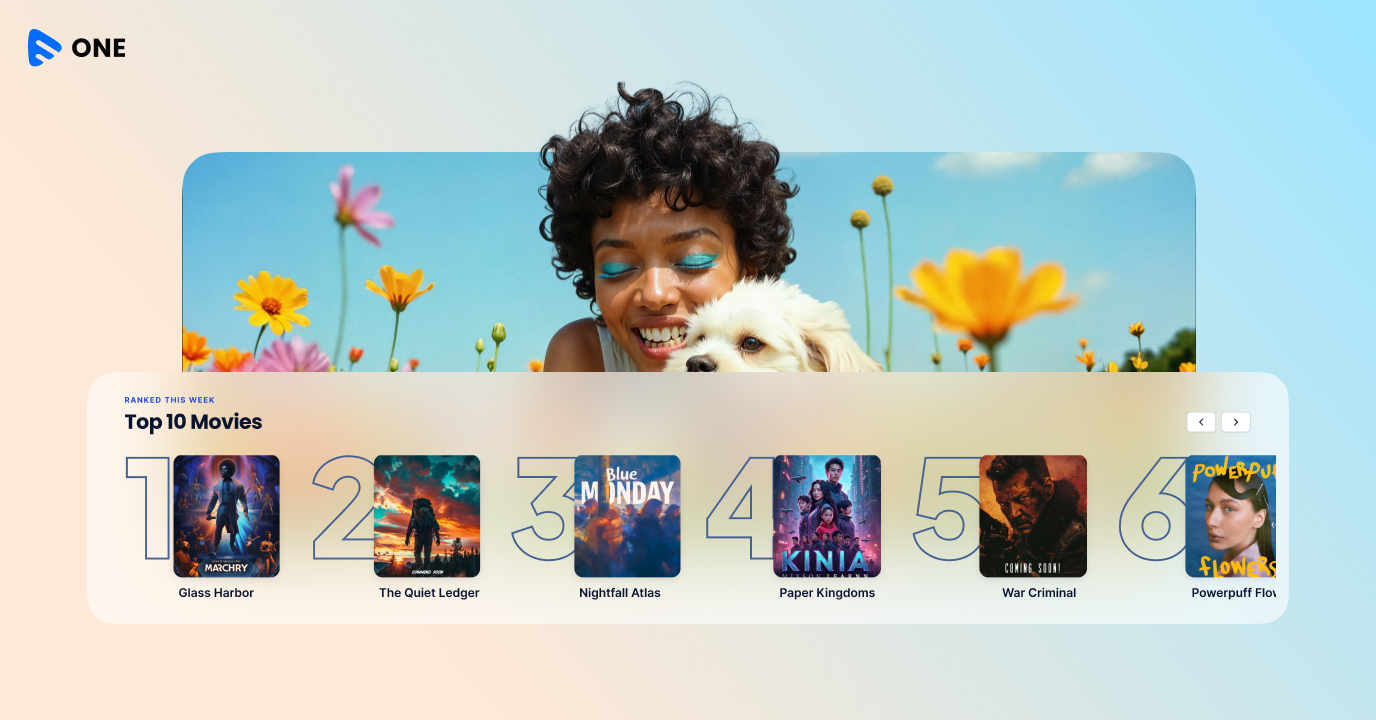
You can also add rankings to manual featured sections and display content in a numbered order from one to ten.
Ranked sections are useful for creating lists such as Top 10 Movies, Top 10 Shows, or Most Watched This Week. They give viewers a simple way to see what is popular and decide what to watch next.
Because rankings are manually configured, your team controls which titles appear and the order in which they are displayed.
Want to see how featured sections are configured in a live CMS? Start a free trial of Muvi One and build your first automated and manual rows in the same session. |
How to Structure Your OTT Homepage
A well-organized homepage can make it easier for viewers to find something they want to watch thereby making your ott personalization easier and more effective. While the ideal layout depends on your audience and content library, this structure works well as a starting point:
- Continue Watching – Show this to signed-in viewers so they can quickly resume content they have already started.
- Featured or Top 10 – Use a manually curated section to highlight important content, new releases, or your most popular titles.
- Recommended For You – Help viewers discover content based on their viewing history and interests.
- Trending Now – Show what other viewers are watching to give users more ideas and highlight popular content.
- New Releases – Give recent additions to your library a prominent place on the homepage.
- Genre, Language, or Country Sections – Organize your wider catalog into relevant categories so viewers can easily browse content that interests them.
- Seasonal or Promotional Sections – Use temporary sections for campaigns, festivals, special events, or other promotions, and remove them when they are no longer relevant.
The key is to keep the homepage focused. Review your manual sections regularly and remove anything that is no longer useful. Adding too many rows can make the homepage harder to navigate and cause important content to get buried. With Muvi One, you can easily customize and create your own featured lists.
Final Comments
A large content library does not automatically make it easier for viewers to find something worth watching. The way content is organized and presented on the homepage plays an important role in discovery and engagement.
Featured sections give OTT platforms a simple way to bring structure and personalization to that experience. With Muvi One, you can combine automated sections based on viewer behavior with manually curated and ranked sections based on your content strategy. You can also organize content by genre, language, country, campaigns, and more. The result is a homepage that can adapt to viewers while still giving your content team control over what gets highlighted. When the right content is easier to find, viewers have fewer reasons to keep searching and more reasons to start watching.
If you are looking to build your next OTT platform, Muvi One provides the tools you need to launch, manage, and grow your streaming business from a single platform. It supports DRM-enabled content protection, global payment methods, multiple monetization models such as subscriptions, advertising, and pay-per-view, and branded OTT websites and apps across web, mobile, TV, and connected devices.
With Muvi One, you can design and deploy your featured sections any way you want across your apps and website. Get a free 14-day trial to learn more.


Add your comment