The global OTT video market is on track to hit $3.7 trillion by 2033. That kind of growth means one thing for content businesses: the competition for viewer attention has never been fiercer. Viewers bounce off your platform in seconds if they don’t like the UI.
The challenge has always been that building a stunning OTT platform UI required a team of designers and front-end developers, weeks of iteration, and a significant budget. That barrier is now gone.
Muvi’s Visual Designer is a fully no-code, drag-and-drop design studio built specifically for streaming platforms. Whether you are launching your first OTT service or refreshing an existing one, Visual Designer puts the creative control entirely in your hands — no developer, no waiting.
What Is OTT UI Design and Why It Matters
OTT UI design refers to the visual layout, navigation structure, and interactive elements that make up the front-facing experience of a streaming platform. Think of how Netflix organises content rows, how Disney+ uses hero banners, or how Spotify surfaces playlists based on mood. Every colour choice, font selection, and button placement is intentional.
For independent OTT businesses, strong UI design does two things:
- Reinforces brand identity,
- Reduces subscriber churn by making content easy to find
According to research, users decide within the first few seconds whether a platform feels trustworthy enough to purchase a subscription.
That is why UX/UI features for OTT apps have become such a competitive differentiator. Platforms that invest in a clean, on-brand, responsive design consistently outperform those that rely on default templates with zero customisation.
Read More: OTT User Experience: 10 Best Practices to Reduce Churn in OTT
What Is Muvi’s Visual Designer?
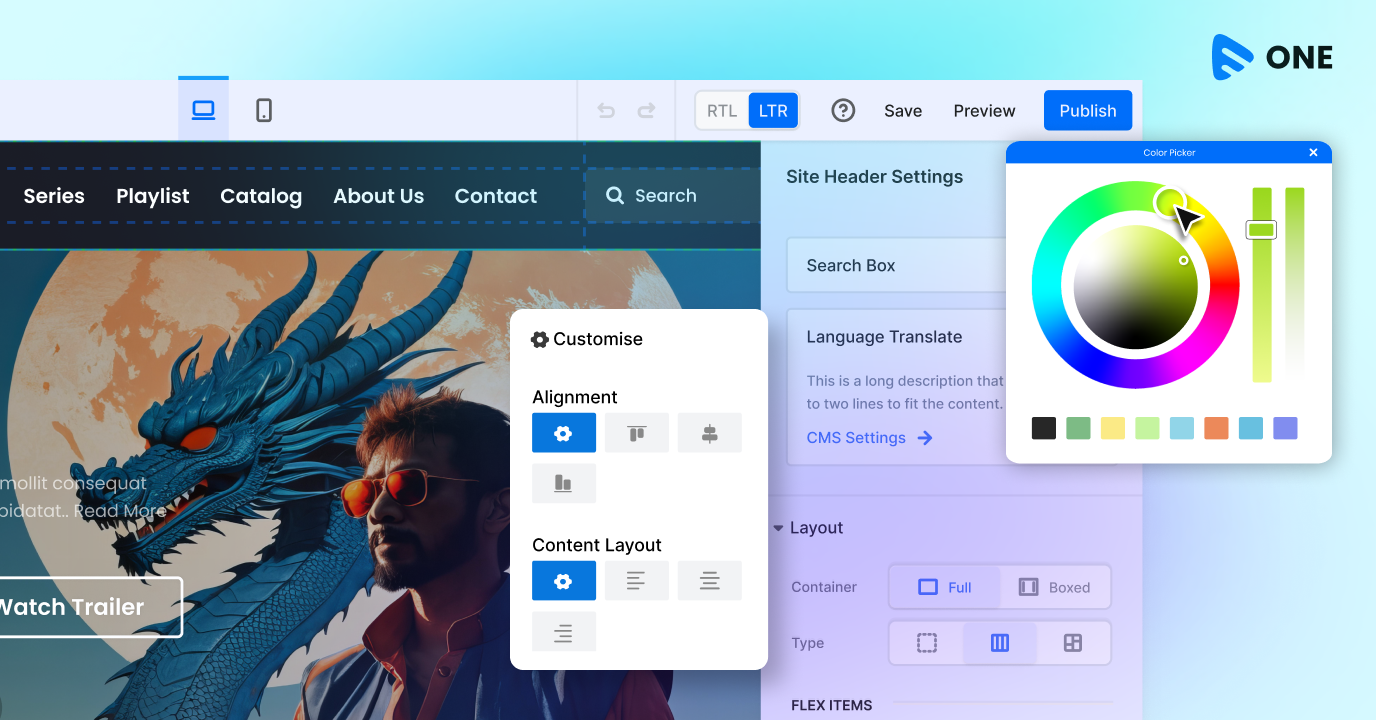
Muvi’s Visual Designer or VD is the world’s first no-code, drag-and-drop OTT platform design studio. It is built directly into Muvi One, Muvi’s flagship white-label OTT solution, and gives platform operators complete control over every visual element of their streaming service.
Unlike generic website builders, Visual Designer is purpose-built for streaming. It understands OTT page structures — hero banners, content carousels, category grids, player pages, subscription landing pages — and lets you design each one without touching a line of code.
The WYSIWYG editor means what you see in the designer is exactly what your viewers see when they land on your platform. You can edit text, change fonts and colours, upload logos, rearrange page sections, and swap banners — all in real time, all from one place.
💡 Key Fact Visual Designer works across web, mobile app, and TV app surfaces — so your brand looks consistent whether someone watches on a browser, a phone, or a smart TV. |
Key Features That Set Muvi’s Visual Designer Apart
Here is a closer look at what makes Visual Designer genuinely different from anything else available for OTT builders:
Zero-Code Design Studio
The drag-and-drop interface lets you modify any element on any page without writing code. Add widgets, reorder sections, change background colours, update typography, and insert CTAs — all through a clean, accessible UI. Just click, drag, and publish.
Real-Time Edits and Preview
Every change you make inside Visual Designer reflects instantly in the preview pane. You see your platform exactly as your subscribers will. Once you are satisfied with a change, hit Publish and it goes live within seconds. The Draft Reset feature also lets you undo all draft changes with one click and restore your template to the last published version.
Banner Management
Banners are prime real estate on any streaming platform — they are the first thing viewers see and the fastest way to promote new content. Visual Designer includes a full Banner Management module: upload, edit, reorder, duplicate, or delete banners. Add custom text, CTA buttons, and dynamic video banners to make your homepage feel alive and campaign-ready.
Mobile Editor
Over 80% of people watch video content on mobile devices. Visual Designer includes a dedicated Mobile Editor that lets you design the mobile app experience separately from the desktop view. Optimise layouts, adjust banner sizes, fine-tune menu items, and add mobile-only design elements — all from within the same design environment.
TV App Visual Designer
Big-screen viewers expect a cinematic, immersive experience. The TV App Visual Designer lets you customize TV app homepages, manage image and video banners, add CTAs and content metadata, and preview every update in real time. Your smart TV experience stays branded, without a separate developer build.
Pre and Post-Login Page Personalisation
This is a conversion feature as much as a design one. Visual Designer lets you show a different homepage layout to guest users versus logged-in subscribers. A guest visitor can see a persuasive content preview and a prominent signup CTA, while a logged-in user lands directly on their personalised content feed.
Page-Level Controls and Global Search
Managing a multi-page OTT platform — home, browse, category pages, player pages, account pages — gets complex fast. Visual Designer includes an accessible page-level dropdown and a Global Search so you can jump between pages instantly, create new static or dynamic pages, and keep your entire platform’s design cohesive.
Built-In CKEditor for Text Editing
Format text exactly as you need it: change font styles, sizes, and colours; add bold, italic, or underline; insert internal or external links. All text editing happens inside a familiar rich-text editor — no HTML required.
Design Once, Publish Everywhere: Web, Mobile, and TV
One of the structural advantages of Visual Designer inside Muvi One is that it covers every surface your viewers use. Most OTT operators need to maintain consistent brand identity across a website, mobile apps, and smart TV apps.
With Visual Designer, you manage web, mobile, and TV app designs from a single, unified design environment. Changes to your brand colours propagate across surfaces. Banners and hero content can be configured for each screen size.
This is one of the reasons why launching a white-label OTT platform with Muvi One is faster and cheaper than building from scratch. The design infrastructure is already there. Visual Designer is the front door to a complete, production-ready streaming ecosystem.
Start Faster with the Muvi Template Marketplace
Launching a design from a blank canvas is one option, but Muvi One also gives you a rich library of pre-built templates — each designed for a specific streaming use case.
Templates are available for:
- Media & Entertainment platforms
- Sports streaming services
- eLearning and online education
- Religious and community streaming
- Fitness and wellness platforms
- Podcast and audio streaming
Browse the template marketplace, preview each option, and pick the one that fits your brand direction. Then open Visual Designer and start making it yours — adjust colours to match your brand palette, upload your logo, swap the hero banner, and update the navigation structure. A professional-grade OTT platform design in hours rather than months.
Built-In SEO Tools for Better Discoverability
A beautiful platform that search engines cannot find is a missed opportunity. Muvi’s Visual Designer includes built-in SEO tools at the page level. You can set meta titles, meta descriptions, and alt tags for images directly within the editor — and even insert custom code snippets for analytics tools, tag managers, and third-party integrations.
For Developers: The Code Editor
Visual Designer’s no-code approach covers the vast majority of design needs for any OTT operator. But for teams that want micro-level control, the Code Editor mode is always one click away.
Switch to Code Editor and modify the template directly with HTML and CSS. Changes reflect instantly in the preview. This makes Visual Designer flexible for both non-technical founders who want independence from developers, and for engineering teams that want to extend the platform’s design capabilities without building a custom front end from scratch.
That flexibility — no-code by default, code-level when needed — is exactly what modern OTT platform builders need. It removes the binary choice between creative control and technical simplicity.
Who Benefits Most from Muvi’s Visual Designer?
Visual Designer is designed for anyone who wants to own their streaming platform’s visual identity without outsourcing the design to a third party. In practice, that means:
- Content creators and independent filmmakers launching their OTT platform
- Media companies building branded OTT services to reduce dependence on aggregator platforms
- Education businesses creating eLearning platforms
- Sports organisations and faith-based networks building niche streaming communities
- Enterprises deploying internal streaming portals
📌 Worth Knowing Muvi One’s Visual Designer is available on a 14-day free trial, so you can build, design, and preview your full OTT platform before committing to a plan. No credit card required. |
Design Is Your Brand’s First Impression — Make It Count
The streaming market is not short on content. What separates successful OTT platforms from the ones that struggle is the experience they deliver from the very first click. A well-designed, on-brand streaming platform builds trust, reduces churn, and creates a viewing environment audiences want to return to.
Muvi’s Visual Designer removes every barrier between your creative vision and a live, production-ready OTT platform. From drag-and-drop simplicity to mobile and TV app coverage, from real-time previews to built-in SEO tools — Visual Designer is the most complete, purpose-built OTT design studio available today.
If you are planning to launch a streaming platform or redesign an existing one, explore Visual Designer on Muvi One and start your free trial today.



Add your comment